A YouTube channel audit usually means a broad review of a channel — branding, upload schedule, playlists, metadata, thumbnails, analytics — and it's the term used both by creators reviewing their own channel and by services and coaches selling the review as a package. Within that broad review, the part that actually changes what you do next is narrower: a comparison between what your packaging promises a viewer and what your content delivers once they click. This article covers that narrower diagnostic core, not the full checklist a paid audit service might run through.
What a channel audit actually is
A full channel audit typically covers: branding and channel page layout, upload consistency, playlist structure, metadata and SEO, and analytics — usually done by the creator themselves, though services and freelancers also sell it as a package, and the output is normally a written list of findings rather than a fixed report format. The diagnostic core of that review — the part this article focuses on — is a comparison between packaging (the title, thumbnail, and metadata that decide whether a video gets clicked) and content (the pacing, structure and payoff that decide whether a viewer stays once clicked). A channel with strong packaging and weak content looks, on average, exactly like a channel with weak packaging and strong content, and the two need opposite fixes, video by video.
The two failure modes an audit separates
Underperformance usually traces back to one of two places, and an audit exists to tell them apart before any fix is chosen. Low click-through rate against impressions means people are seeing the packaging and passing on it — a discovery problem. Low average view duration or a retention graph that falls off early means people clicked and then left — a content problem. Misdiagnosing one as the other wastes the fix: a reshot intro doesn't help a video nobody was clicking on, and a punchier thumbnail just recruits more people who bounce just as fast. You can read the mechanics of that graph in more depth in how to read your youtube retention graph, and the CTR side is covered in what is a good click-through rate on youtube?.
What to actually check, in order
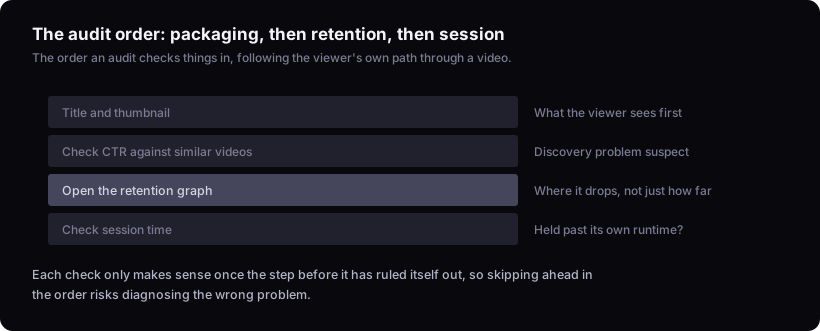
The audit sequence follows the viewer's own path: title and thumbnail first, then the retention graph, then session time. Start with what the viewer sees before they click — the title and thumbnail together, and the CTR that results. Look at the thumbnail at the size it's actually seen: shrunk to phone-search size, does the subject still read at a glance, and does the title add information the thumbnail doesn't already show rather than repeating it. List your last several videos on the same topic or format, sort them by CTR, and see where this one falls. If it sits near the bottom of that list, packaging is the first suspect. Next, open the retention graph for that same video and look for where it drops rather than just how far it drops. A steady decline spread across the video usually points to pacing or a topic that runs longer than it needs to — the fix is tightening or cutting, not re-editing one moment. A sharp cliff at one specific timestamp is more actionable: scrub to the seconds before the drop and watch that stretch with the sound off, since cliffs are usually visible as a beat that doesn't match what was promised, a hard tonal shift into a sponsor read, or a cut that breaks continuity. Whichever it is, the fix is to reshoot or re-edit that specific stretch, not the whole video. Last, check session time: in Studio, this is the session-start and session-duration data on the video's own analytics page, compared against the channel's typical session length for similar videos. A video that holds session time near or above that typical length is pulling viewers into more of the channel afterward; one that falls well short is sending them away even though its own retention looked fine. what is session time on youtube? covers the metric itself in more detail, since a video can retain its own viewers well and still fail to hold them past its own runtime.
What an audit checklist wastes time on
Tag cleanup is a fixture of most audit checklists, and it's mostly wasted effort. YouTube's own guidance (see the YouTube Help documentation on tags) describes tags as a minor tool, useful mainly for catching common misspellings of your video's title, not a discovery lever worth auditing carefully — the fuller picture is in do youtube tags still matter? what they actually do now. An audit that spends real time rewriting tags across a back catalogue, for anyone still running that kind of pass, is spending effort on the part of the checklist that moves the least, while the title, thumbnail and first seconds of retention — the parts that actually decide outcomes — go unexamined. If an audit checklist gives tags equal billing with title and thumbnail work, that's a sign the checklist was built for completeness, not for effect.
Auditing at the video level versus the channel level
A channel-wide average hides the exact videos an audit needs to find. If ten videos perform near the channel's normal and one performs far above it, a blended average shows a slightly-better-than-usual month — it doesn't show you the video worth studying. A video running well past a channel's recent normal is worth a real look. To set that baseline, use the channel's last several videos of a similar format and length, at a comparable age since publish (comparing a week-old video to one that's had a year to accumulate views will distort the comparison), and set Shorts aside from long-form when comparing since they draw from different pools. Against that baseline, pull the outlier up alongside it and compare title structure, thumbnail composition, and where in the video retention starts to diverge — the standard we judge by is the multiple against that channel's own baseline, not the raw view count. The same logic applies to underperformers — a video that badly missed the channel's normal is just as diagnostic as one that beat it, and an audit should pull both lists, not just the wins. Comparing what a smaller or larger channel in the same niche does with its own outliers can sharpen this further; that's covered in youtube competitor analysis: beyond the one-channel teardown.
How often to run one
Cadence should track channel maturity, not a fixed calendar. A newer channel gets more value from checking sooner and more frequently, because each new video is a bigger share of its total evidence so far. In our experience a channel with more upload history has less need to check on every single upload, because each new video moves the overall picture less — though when an audit does happen, there's simply more to go through, since a larger catalogue means more formats and videos to review. In practice: a channel in its first year or so of consistent uploads can reasonably audit after every handful of videos. Past roughly a year of steady, regular uploads, moving to a quarterly rhythm doesn't lose much. In between — an established channel uploading irregularly, or with a short but inconsistent history — the safer default is to lean toward the more frequent end until a real pattern of consistency is visible. The exception is a sudden shift — a launch of a new format, a title style change, or a visible drop in a metric you track — which is worth an audit regardless of when the last one happened.
Can this be done from public data alone?
Some of it can, and some of it genuinely can't. Impressions, CTR, and retention are only visible inside YouTube Studio for your own channel — public view counts and upload dates can suggest where to look on a competitor's channel, but they can't confirm a discovery-versus-content diagnosis for anyone but you. Public data is useful for a different, looser kind of pattern-spotting: not establishing a channel's own baseline, but noticing when the same format or title approach turns up as an independent outlier on several unrelated channels. That's a weaker signal than an internal baseline comparison — it can tell you an idea is worth testing, not that it will work on your channel — and by our standard it's only meaningful if you also check for channels that tried the same thing and it didn't land, or you're only seeing the survivors. But that's pattern-spotting for ideas, not an audit of your own channel. The audit itself needs your Studio numbers.
What this reasoning can and can't tell you
Worth being upfront about: this is a framework built from public documentation and how these metrics are defined, not a report of a real audit run on a specific channel's Studio data. It describes what to look for and in what order, and why one metric points to packaging while another points to content — use it as the method, then run it against your own numbers.
Turning an audit into a fixed list, not a report
An audit that ends in a document restating your metrics back to you has failed at its one job. The output should be a short, prioritized list of specific changes tied to specific videos or patterns. Prioritize by how many videos a fix touches and how far the video sits from the channel's baseline: a packaging fix that applies to several similar videos outranks a one-off content fix on a single video, and a video running far off the channel's normal outranks one that's only slightly off. A discovery fix like a rewritten thumbnail; a content fix like a reshot intro; or, if the format itself keeps underperforming across multiple attempts, dropping the format entirely —. If the audit surfaced a genuine content problem rather than a packaging one, the fix belongs in the next script, not the next title; what to check before publishing a youtube video is a reasonable place to fold that fix into your normal process so it doesn't get relitigated every time. A channel that's gone quiet for longer needs a different starting point than a routine audit — that's covered separately in how to revive a dead youtube channel (diagnose first). Either way, the test of a good audit is whether you know exactly what to change next, not whether you understand your channel better in the abstract.