Session time is how long a viewer keeps watching YouTube across an entire visit, from the first video they open to the point they close the app or leave the site. It is not the same as watch time or average view duration, which both measure a single video. That distinction matters because a video can do everything right by its own numbers and still fail the thing YouTube's suggestion system is actually watching for: whether the viewer kept going afterward.
Session time vs watch time vs average view duration
Watch time is the total minutes viewers spend on a specific video, added up across everyone who watched it. Average view duration divides that total by the number of views, giving you a per-viewer average for that one upload. Both numbers live in your analytics, tied to a single piece of content.
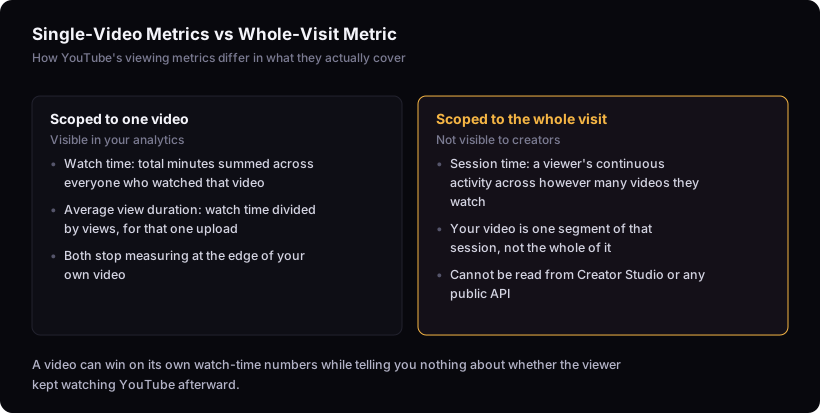
Session time is different in scope. It is the length of a viewer's continuous activity on YouTube, spanning however many videos they watch in one sitting. Your video is one segment of that session, not the whole of it. A viewer can watch your entire video, close the tab, and end their session there — or they can finish your video, click into whatever plays next, and keep going for another hour. Watch time and average view duration cannot tell you which of those happened, because both stop measuring at the edge of your own video.
Why session time lives in suggested videos, not search
Session time is believed to factor into suggested and recommended placement because that surface is about keeping a viewer moving through YouTube, not about matching a query. When someone searches, YouTube's job is to answer that specific search — relevance to the query is the dominant concern, and YouTube's documentation on search ranking describes matching intent, not extending a session. Suggested videos and the homepage feed serve a different goal: keeping someone on the platform once they're already there with no specific request in mind. YouTube's guidance on how the suggested-videos system works describes optimizing for viewer satisfaction and continued watching, which is a session-level goal by definition.
This is why a video can rank well in search off the strength of its own relevance and retention, and separately succeed or fail at extending a session depending on what happens after it ends. Two different mechanics, two different jobs.
What you can and can't measure about your own effect on it
You cannot see a session-time number for your channel, and no external tool can show you one either, because YouTube does not expose it in Creator Studio or through its public APIs. What you can see are adjacent signals: your own retention curve, how to read your YouTube audience retention graph tells you where viewers drop off inside your video, and end-screen or card click-through data tells you whether viewers took the next step you offered them.
Neither of those is session time. They are inputs you can influence and observe, not proof of the outcome. Any claim that a specific change "improved session time" is an inference built on those adjacent signals, not a measurement of the thing itself. Treat it that way.
Production choices believed to extend a session
A handful of tactics are commonly cited as ways to help a session continue past your video, though none of them are guaranteed and none are things you can verify against a session-time figure you don't have access to.
End screens and cards that point to a specific next video, rather than a generic subscribe prompt, give a viewer an obvious next step instead of leaving them to browse. Series structure — a video that sets up a clear reason to watch the next installment — creates its own continuation logic independent of what YouTube suggests. Natural follow-up framing inside the video itself, where you reference a related topic a viewer might want next, can prime someone to click through even before the end screen appears.
These are plausible levers because they all reduce the friction between finishing your video and starting another one. None of them are proven to move a session-time signal you cannot observe. They are worth doing because they make sense mechanically, not because they are confirmed.
Where high retention and session time can pull apart
A video that maximizes its own average view duration does not automatically extend the session. It's easy to assume the two move together, but they can pull in opposite directions. A viewer who is completely satisfied by your video — no loose threads, question fully answered, nothing left to want — has less reason to click into anything else. High retention on that video can coincide with the viewer closing the app right after, because you gave them a complete, self-contained experience.
Conversely, a video with a mediocre retention curve that ends by raising a specific, related question can send a viewer straight into another video, continuing the session even though its own numbers look weaker. Optimizing for one does not guarantee the other, and a channel chasing only average view duration what it actually measures is worth checking here can end up making videos that are individually strong and collectively bad at keeping anyone around afterward.
What this article can't tell you
This can only report what YouTube's own documentation says about suggested-video ranking and the goals it names. It cannot show you internal session-time measurements, confirm how heavily the signal is weighted against other factors, or prove that any specific production tactic — end screens, series, follow-up framing — changes session time in a measurable way. No external, publicly verifiable data on session time exists. Anyone stating a specific weighting or a guaranteed tactic is asserting something nobody outside YouTube can confirm.
What to check instead
You can't see your session-time contribution, but you can see how your impressions and views relate to each other, and you can check whether your click-through rate is doing its job at getting the video opened in the first place. Those, plus your retention graph and end-screen clicks, are the honest inputs available to you. For definitions of the other metrics mentioned here, the metric glossary has them in one place.