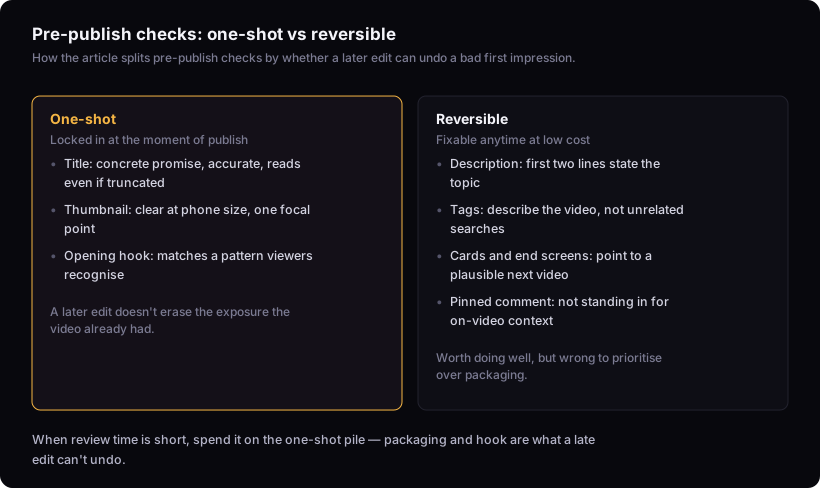
Before you publish, the checklist splits into two piles: title, thumbnail, and the first minute, which are locked in the moment the video goes live and are hard to fully undo; and description, tags, cards, end screens, and pinned comments, which you can change anytime at little cost. That distinction is the fastest way to spend limited review time on the right pile.
This is a diagnostic, not a promise.
Two kinds of pre-publish check: one-shot vs reversible
The reason this split matters: review time is limited, especially close to a deadline, and not all checks return equal value. A typo in your description is a five-minute fix later. A weak hook in the first few seconds is the harder problem, because you won't see its effect until you're already looking at the retention graph.
The one-shot checks: packaging and opening hook
Title, thumbnail, and the opening seconds of the video are the one-shot checks, because they're what a viewer sees first and what a late edit can't retroactively change about the video's first exposure.
Check your title for three things: it names a concrete outcome or result rather than a vague topic, every word in it is true of what the video actually contains, and it still reads clearly if the platform truncates the end. If you'd click it from a stranger's channel with no other context, it passes. More detail on constructing one is in how to write youtube titles that get clicks. Check your thumbnail at the size it'll actually be seen: shrink it to phone-sized on your screen and see if the subject and any text are still readable in about a second. If it needs more than one focal point or more than a few words to make sense, it's doing too much. It also shouldn't repeat the same words as the title — the two should tell the viewer two different things. More on building one is in designing the thumbnail. And the opening of the video needs a hook that matches one of the recognizable patterns viewers respond to, which is the subject of the youtube hook formula: six archetypes and how to pick one.
All three of these are effectively locked once the video is live. YouTube lets you edit a title or swap a thumbnail after upload, but the video has already had its first exposure under the old packaging, and that exposure is what feeds the decision about whether to show it to more people. A late fix doesn't get you back to where you'd have been if the packaging had been right from the first minute.
The fixable-later checks: metadata, description, cards, end screens
Description text, tags, cards, end screens, and pinned comments are reversible: check that the description's first two lines state what the video is about (that's what shows before 'more'), that tags describe the video rather than trying to catch unrelated searches, that any card or end screen points to a video a viewer of this one would plausibly want next, and that a pinned comment isn't standing in for context that belongs in the video itself. They're worth getting right, but getting them wrong isn't a one-shot mistake.
You can rewrite a description an hour after publish. None of these carry the same weight as packaging, because none of them are what most viewers see before deciding whether to click or whether to keep watching.
That doesn't mean skip them. It means: if you're rushing, this is the pile you can leave imperfect and fix tomorrow. The pile above is not.
Why title and thumbnail edits after publish sometimes don't recover lost momentum
YouTube does let you change a title or thumbnail after the video is live, but the edit doesn't erase what already happened. The video's early clicks and watch time happened under the original packaging and can't be replayed under the new one. A fix afterward can stop things from getting worse, but it doesn't undo the first impression the video already made while the packaging was off.
This is the core reason packaging belongs in the one-shot pile even though YouTube's interface makes it look editable. Editable is not the same as reversible in effect.
Checking the video against what already works in the niche
A pre-publish sanity check that costs nothing: compare your title, thumbnail, and premise against videos in your niche that have clearly overperformed their channel's normal range. You're not copying them. You're checking whether your packaging communicates as clearly as theirs does, and whether your premise is distinct enough to earn a click next to them.
If you don't already have a shortlist of these, the method for building one is in how to find outlier videos in your niche. This step belongs before publish, not after, because it's the one place gut feel can be replaced with something you can actually look at.
A fast pre-publish pass vs a full review
On a deadline, check only the one-shot items: does the title make a specific promise, does the thumbnail read clearly at a glance, does the first minute deliver on what the title and thumbnail imply. That's the minimum. Skipping it to fix a typo in the description is the wrong trade.
A full review adds the reversible items — description, tags, cards, end screens, pinned comment — plus the outlier comparison above. Do the full pass when you have the time, but never let it push out the one-shot pass. If you have ten minutes before you have to publish, spend them on packaging and the hook, not on tags.
A channel testing a new format for the first time should lean toward the full review, because there's no established pattern to fall back on if the packaging misses. A channel publishing its established, familiar content type can often run the fast pass, since there's less to newly verify when the packaging follows a shape that's already been checked before.
Does upload timing belong on this checklist?
Not really — it's a scheduling decision made separately from any individual upload, so it doesn't belong on a per-video checklist.
What this checklist can't tell you
A pre-publish review only catches avoidable, self-inflicted mistakes in packaging and hook. It cannot tell you whether the video will perform. That depends on audience response, what else is competing for attention that week, and timing factors that only become visible once the video is live. Nobody can predict that from a checklist, including one built around the one-shot distinction above. What the checklist does is make sure that if the video underperforms, it isn't for a reason you could have caught yourself. If a video does flop after a clean pre-publish pass, the next step isn't a longer checklist — it's diagnosing what happened, which is a different question covered in why your youtube videos aren't getting views.