There is no fixed percentage that counts as a good click-through rate on YouTube. YouTube has not published one, and the ranges you'll find quoted online disagree with each other because they're averaging over different niches, different channel sizes, and different mixes of where impressions came from. The number YouTube Studio shows you only means something once you compare it against your own history, not against a stranger's benchmark.
Why a single "good CTR" number doesn't hold up
Every benchmark range circulating in forums and blog posts is a summary of somebody else's videos, in somebody else's niche, at some unspecified mix of traffic sources. None of that transfers to your channel. A gaming channel and a personal-finance channel do not draw the same click behaviour from the same thumbnail quality, and a channel with a large subscriber base pulls a different impression mix than a channel still building one.
This is also why two credible-sounding sources can quote non-overlapping ranges and both be "right" for the sample they happened to look at. The number was never general in the first place. Treating it as a target to hit is treating a description of someone else's audience as an instruction for yours.
CTR splits by traffic source
Browse, suggested, and search impressions produce structurally different click behaviour, so a single blended CTR figure hides more than it reveals. A viewer scanning their home feed is comparing your thumbnail against a dozen others competing for a glance. A viewer in the suggested panel next to a video they're already watching is making a narrower comparison, often against content adjacent to what already has their attention. A viewer who typed a search query already has an intent your title either matches or doesn't — click behaviour there is closer to a yes/no decision than a scan.
| Traffic source | What the viewer is doing | What that does to the click |
|---|---|---|
| Browse | Scanning a home feed against a dozen thumbnails competing for one glance | A glance-level comparison |
| Suggested | Sitting beside a video they are already watching | A narrower comparison, against adjacent content |
| Search | Arriving with a stated intent your title either matches or does not | Closer to a yes/no decision than a scan |
YouTube Studio lets you break impressions and CTR down by traffic source. If you only ever look at the headline "Impressions click-through rate" figure, you're looking at a blend of these three very different behaviours, weighted by whatever mix that particular video happened to get. Two videos with identical blended CTR can have gotten there from opposite traffic mixes, and comparing them as if they're the same thing is comparing different questions that happen to produce the same-looking answer.
Why CTR moves as a video ages
A day-1 CTR reading and a week-3 CTR reading are answering different questions, because the audience seeing the thumbnail changes as the video ages. In the first hours after publishing, a disproportionate share of impressions typically comes from subscribers and people already tracking your channel — a warmer audience than the cold browse traffic the video will pick up later if it keeps performing. As the video ages, the traffic-source mix shifts, and so does the CTR, independent of anything about the thumbnail or title changing.
That means checking CTR on day one and treating it as the video's verdict is checking a number that hasn't stabilised yet. Comparing that early reading against an external benchmark, which was presumably averaged over a video's full run, compounds the mismatch. If you want a reading that means something, look at the same age-window every time — day 7 versus day 7, not day 1 versus a benchmark that was never time-bound in the first place.
Building your own baseline instead of chasing a benchmark
The workable version of "good CTR" is relative: good compared to what this channel normally does, at this traffic mix, at this video age. Pull your last several videos in the metric glossary terms you already have in Studio, filtered to a comparable age window, and note the median CTR for each major traffic source separately rather than one blended number. That median is your baseline. A new video sitting meaningfully above it, on a comparable source mix and age, is doing something different from what you normally do — that's the useful signal, not whether it clears some outside number.
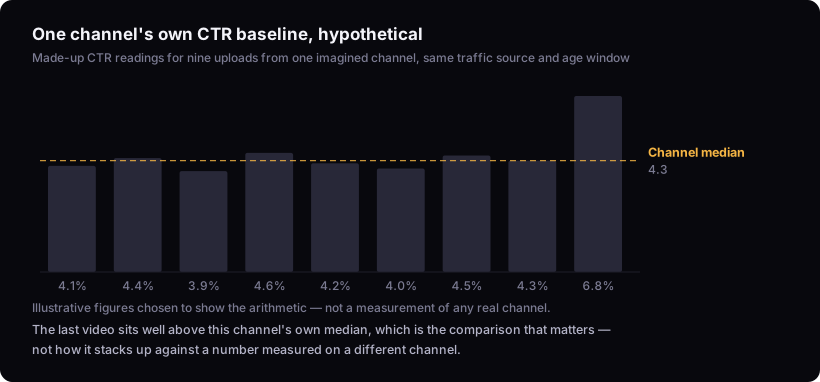
This is the same logic behind judging whether a video counts as a genuine outlier video on YouTube: the comparison that matters is against the channel's own typical performance, not against an industry figure that was never measuring your channel to begin with.
When a high CTR is actually a bad sign
A high CTR doesn't always mean the thumbnail and title are working well — it can mean they're overpromising relative to what the video delivers. If a title makes a stronger claim than the video actually answers, or a thumbnail implies something that isn't really in the footage, you can pull a click rate above your own baseline while retention falls off hard in the first ranked seconds, because viewers clicked on an expectation the video doesn't meet.
Read a CTR spike next to your audience retention graph before deciding it's good news. A high CTR with retention that collapses early is not a packaging win — it's evidence the packaging and the content are describing two different videos. Fixing that gap belongs with the packaging decisions themselves, in designing the thumbnail and writing the title, not in chasing a higher number in isolation.
Reading CTR alongside other signals
CTR is one input, not a verdict, and it needs to sit next to impressions volume, retention, and how the video compares to the channel's own baseline before you conclude anything. A high CTR on a video that got very few impressions is a different situation from the same CTR on a video the algorithm pushed hard — the first tells you almost nothing yet, the second is a stronger signal because more of the audience pool got a chance to react.
If a video is underperforming despite a healthy CTR, or overperforming despite a mediocre one, the explanation is rarely in CTR alone. Why your YouTube videos aren't getting views walks through the other places to look. For the full sequence of decisions that shape how a video gets packaged before it ever reaches an impression, the rest of the upload page covers what sits alongside title and thumbnail.
What this can't tell you
This article works from YouTube's own published documentation and general reasoning about audience behaviour, not from any dataset of actual channel CTR figures. Nobody outside YouTube can hand you the number your specific next video should hit — that number depends on your niche, your channel's history, and a traffic mix that hasn't happened yet. What you can do is read the number YouTube Studio already gives you against your own baseline, broken out by source and by age, instead of against a range someone else measured on a channel that isn't yours. If you want that comparison run for you automatically, the bench optimize tool measures new videos against a channel's own median rather than an external figure.