retention graph first,then know which fix your video needs.
Editing for retention starts with reading your retention graph to find the shape of where viewers left, then applying specific cuts depending on that shape. A gradual, steady decline usually calls for tighter pacing — cutting dead air on the breath before a restart, varying shot length where the footage sits static, and reinforcing claims visually. A sharp drop at one timestamp usually points to a mismatch between what the title or hook promised and what's actually there at that point, which pacing changes won't resolve.
This article covers what editing genuinely fixes, what it can't, and how to tell the two apart before you spend hours trimming a cut that was never going to save the video.
What "editing for retention" actually means
Editing for retention is pacing, clarity and visual variety applied within a structure that already exists — it is not the structure itself. That distinction matters because most advice blurs it: articles that promise "editing tips for retention" mix in things that are really scripting or packaging decisions, like what you promise in the first line or what your thumbnail sets up.
Editing operates at the sentence and shot level. It decides how long a sentence sits on screen before the next idea arrives, whether a static talking-head segment needs a cutaway, whether a pause is dead air or a deliberate beat. It does not decide what the video is about, what it promises, or whether that promise is worth keeping. Those are scripting and packaging problems, and they get solved before you open the timeline — the hook is built at the writing stage, not the edit stage, which is why the youtube hook formula: six archetypes and how to pick one covers hook construction separately from this article.
Keeping this boundary clear saves time. A creator who treats every retention problem as an editing problem will re-cut a video for hours without touching the actual cause.
Read the graph before you cut anything
The retention graph tells you where viewers left, and that location is the single most useful piece of information you have before opening an editing program. A graph that drops steadily from 0:00 is a different problem than one that falls off a cliff at 2:15, and treating both with the same editing pass wastes effort on the one that pacing can't touch.
Open the graph and look for shape, not just the overall percentage. A gradual downward slope across the whole video often points to loose pacing, though it can also come from traffic source or audience mix rather than the edit itself. A sudden vertical drop at a specific timestamp more often means something at that second didn't match what viewers expected. Neither shape proves its cause on its own, but they call for looking in different places.
How to read your youtube retention graph walks through the mechanics of pulling this up and interpreting the axis correctly — worth doing before any edit, not after.
Diagnose the drop: editing fix or structural fix
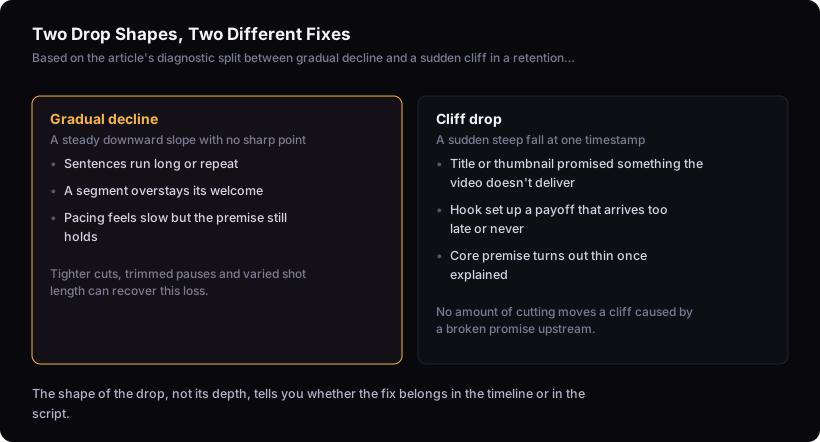
A boredom-shaped decline is gradual and often responds to pacing work; a cliff-shaped drop at one specific point is more often a broken promise between what was set up and what's delivered, and pacing changes alone are unlikely to fix that. The shape is a useful starting signal, not a certainty, and it's worth checking against the depth and consistency of the drop before concluding which problem you have.
Gradual decline looks like a graph sloping down steadily minute after minute with no single sharp point. That pattern usually means the pacing is too slow somewhere in the middle — sentences run long, there's unnecessary repetition, or a segment overstays its welcome. This is squarely an editing problem: tighter cuts, trimmed pauses, and varied shot length are the tools for that job — whether a specific re-cut recovers the loss only shows up in the next video's graph.
A cliff — a sudden steep drop concentrated at one timestamp — means viewers hit something that didn't match what they expected. Maybe the video promised one thing in the title and pivoted to another around minute two. Maybe the hook implied a payoff that took until minute six to arrive, and viewers gave up waiting. No amount of jump-cutting fixes this, because the problem isn't pacing — it's that the content at that timestamp isn't what people came for.
A moderate dip that isn't clearly one shape or the other is common — real graphs are noisier than a clean slope or a clean cliff. In that case, look at where the dip sits: near the start, check it against the hook; spread across the middle, check it against pacing first, since that's the cheaper thing to test. If it's a cliff, look at what the hook promised versus what's actually at that timestamp — that's a scripting and hook problem, and how to hook viewers in the first 30 seconds is where that gets fixed, not the edit.
Techniques that redistribute attention
Editing techniques work by removing or restructuring the moments where a viewer's attention has nothing to hold onto, not by adding excitement on top of a slow video. Each technique below targets a specific mechanism.
Cutting dead air. Pauses, filler words, and restarts cost nothing when you're watching yourself talk but cost a viewer real seconds with no new information. In practice this means scrubbing the timeline (or scanning a transcript against it — the transcripts tool lines text up with the timeline for exactly this) and cutting on the breath before a restart, not after it, so the edit doesn't leave a stray inhale. A pause that's carrying a deliberate beat — letting a point land — is different from one that's just a stall; if the sentence would read the same with the pause removed, it's dead air.
Varying shot length. A single unbroken shot for a long stretch gives the eye nothing to reset on. To find where this applies, watch the segment back and note the point where you catch your own attention drifting, or scrub the timeline looking for any stretch with no visual change at all — that stretch is a candidate for a cutaway. Cutting to a different angle, a screen share, or a graphic doesn't add content, but it gives the eye something new to land on.
Visual reinforcement of claims. When you state a number or a comparison, showing it on screen (a chart, an on-screen text callout, footage of the thing you're describing) closes the gap between hearing a claim and understanding it. That gap, left open, is where attention drifts. This is a pacing tool, not a decoration — it removes a small confusion that would otherwise slow comprehension and cost you a few seconds of drift.
All three work the same way: they remove friction between the viewer and the next piece of information. None of them can add information that isn't there.
Where pacing should change across a video's length
Pacing should not stay constant across a video — the opening benefits from the tightest cuts and the least dead air — a viewer who just clicked is still deciding whether the video matches what drew them in, so pacing here has less room for slack. The middle and close can carry more room to breathe, provided the opening has already earned that trust.
The first section of a video is under the most scrutiny. A viewer just clicked based on a promise and is actively deciding whether that promise is being kept. Tight editing here — minimal pauses, quick confirmation of the premise — matters more than anywhere else in the video, because it's answering the viewer's live question of "did I click the right thing."
The middle can slow down once that trust is established, particularly if the content itself needs room — a demonstration, a story, an explanation that benefits from not being rushed. Cutting a demonstration too aggressively can strip out the information the viewer actually wants.
The close needs its own treatment again: a clear resolution of what was promised, without new pacing surprises. How to end a youtube video (so it actually gets watched) covers what the ending needs to do structurally, separate from how it's cut.
Uniform pacing across the whole runtime treats the opening's high-scrutiny moment the same as the middle's settled moment, and that mismatch usually shows up as a slow bleed early in the retention graph rather than a single obvious drop.
What editing cannot rescue
Editing cannot fix a title that oversells the video, a hook that sets up the wrong payoff, or a premise that turns out to be thin once you're a few minutes in. These are content problems, not pacing problems, and no amount of cutting redistributes attention toward content that isn't there.
If the graph shows a cliff at the point where the video's actual subject diverges from what the title or thumbnail implied, tighter editing around that cliff is unlikely to move it, since the drop tracks a mismatch in what was promised, not how the footage is cut. The fix is upstream: either the title needs to accurately describe what's in the video, or the video needs to actually deliver what the title promises. That's a packaging and scripting decision, and it's made before the camera turns on, not in the timeline.
The same applies to a weak idea. If a video's core premise doesn't sustain interest once explained, cutting the explanation shorter delays the drop but doesn't remove it — the viewer eventually reaches the point where there's nothing new left to hold their attention, however fast the cuts got them there.
Knowing this before opening the editor saves the hours that would otherwise go into re-cutting a video that needed a different title, a different hook, or a different idea. If the graph consistently shows this cliff pattern across several videos, that's worth checking against your hook construction directly, and the video teardown is built to line a retention graph up against a script and flag exactly where the mismatch sits.
How this interacts with average view duration
Average view duration is the outcome editing decisions roll up into, but it isn't itself a diagnostic — it tells you the average, not where the loss happened. Two videos with the same average view duration can have completely different graphs: one losing viewers slowly throughout, one losing most of them at a single cliff. Editing fixes the first case and does nothing for the second, so the average alone won't tell you which one you're looking at.
Average view duration on youtube: what it actually measures covers how the metric is calculated and what it aggregates away — worth reading alongside the graph itself so the number doesn't get treated as more diagnostic than it is.
The limit of this method
This reasoning works from the shape of a retention graph, not from watching your footage. It can point to where viewers left and suggest whether the cause looks like pacing or structure, but it cannot judge your b-roll, hear your pacing, or confirm that a re-cut actually worked. Only a new retention graph after you republish or upload the next video can tell you that. Treat the diagnosis here as a starting point for where to look, not a verdict on the footage itself — that judgement still needs your own eyes on the timeline, checked against the graph that comes back afterward.
If you're running this diagnosis across a video and want a second look at where the script and the graph line up, the transcripts tool gives you the text against the timeline, which is often faster than scrubbing manually to find the exact sentence sitting under a cliff.