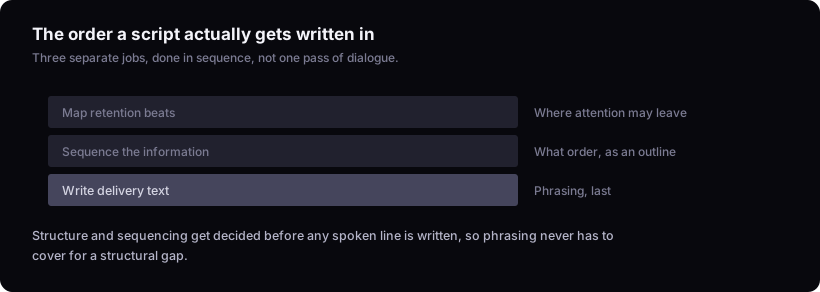
If a script isn't working, the problem usually started before you wrote a single line of dialogue. Writing a YouTube video script is three separate jobs done in order: decide the retention structure of the middle of the video, sequence the information around that structure, then write the actual spoken lines last. Most guides skip straight to sentences, which is why so many scripts read fine on the page and still lose viewers on the timeline.
This piece is mostly about the body of the script — a few whole-video decisions come up because the body can't be planned without them, but the opening hook and the title get no treatment of their own. If you haven't sorted those, the youtube hook formula: six archetypes and how to pick one and how to write youtube titles that get clicks cover them directly. What follows assumes the hook already exists and asks what happens for the next eight or ten minutes.
Why scripts fail before the first sentence is written
A script problem is usually an ordering problem, not a writing problem. The common failure pattern looks like this: write the whole thing top to bottom as it comes to mind, film it, watch the retention graph fall off somewhere in the middle, then go back and try to patch a structural gap with better wording. Wording can't fix a structural gap. If a section had nothing new to offer a viewer, no sentence-level polish saves it.
The fix is to reverse the order creators default to. Most people start with dialogue because dialogue is the part that feels like "writing." But dialogue is downstream of two decisions that have to happen first: where attention is going to want to leave, and what information actually needs to be there when it does. Skip those decisions and you're not writing a script, you're transcribing a first impression.
Stage one: mapping retention beats for the body of the video
The middle of a video needs its own retention plan, separate from the hook. A hook buys the first watch-or-leave decision; it does nothing for the fifth minute. Viewers make repeated leave-or-stay decisions across the runtime, and each one needs a reason answered before it's asked.
Rather than assuming a hook-plus-everything-else split is sufficient, map the body as a series of points where curiosity needs renewing. Ask, at roughly even intervals through the planned runtime: what does the viewer know now that they didn't a minute ago, and what open question is still pulling them forward? If you can't answer the second half of that for a stretch of the video, that stretch is where attention is most likely to decay — and wording alone rarely rescues it.
This is a planning exercise before you have footage, which means it's a guess. The only way to check the guess against real behavior is the audience retention graph after publishing, which is a different tool for a different stage — see how to read your youtube retention graph for what it can tell you once a video is live. At the scripting stage, the best you can do is design deliberately for renewal points rather than hoping the topic carries itself.
Stage two: sequencing information before writing sentences
Before writing a single full sentence, decide what the viewer needs to know and in what order — as a list or outline, not prose. This stage answers a question dialogue-writing can't: does this piece of information need to exist here, or at all?
A practical way to do it: list every fact, step, or claim the video needs to make. For each one, note what it depends on (does the viewer need to already know X to understand this?) and what it unlocks (does this set up something later, or is it just interesting?). Anything that unlocks nothing and depends on nothing stays out, no matter how good it sounds. This is also where you cut — it's far cheaper to delete a bullet point than to delete a paragraph you already voiced and half-edited around.
Order the survivors so each one either answers a question the last one raised or raises a new one the next one will answer. Sequencing is where stage one's retention beats stop being rough marks and become concrete: the beats set where something new has to land, and the chain of information is what actually lands there.
Stage three: writing delivery text last
Full sentences — what you'll actually say on camera — come after structure and sequencing are fixed, not before. Writing dialogue first causes problems because it collapses three decisions into one pass: you're simultaneously trying to figure out what to say, what order to say it in, and how to phrase it, and phrasing is the loudest of the three. It wins the fight, so structural gaps get papered over with a smooth transition sentence instead of getting fixed.
Once the outline from stage two is locked, writing the delivery text is mostly a phrasing problem, which is a much smaller problem than a structural one. You already know what goes where. What's left is finding the words that sound like you saying it out loud rather than you writing it for someone to read. This is also where a script tends to get shorter, because you'll notice bullet points that seemed necessary in outline form don't actually need a full sentence — they can be said in half of one, or shown instead of said.
If drafting delivery text from a locked outline is the part you want help with, the script writer is built for that stage specifically, not for generating structure from a blank page.
Outline vs full script: choosing the right level of detail
A script is a plan for what gets said; an outline is a plan for what gets covered. They're not the same tool. Stages one and two are never optional — but the full-sentence pass of stage three sometimes is, and stopping at the locked outline is a legitimate way to finish.
A word-for-word script earns its cost when precision matters: dense explainers where a wrong phrase changes the meaning, anything scripted for a co-host or voiceover artist who isn't you, or fast-cut formats where timing depends on exact wording. A bullet-point outline is usually enough when the delivery style is conversational and you're the one on camera — you know the material, and forcing memorized sentences over it tends to sound memorized.
| Use a full script when | Use an outline when |
|---|---|
| Wording precision matters (technical, legal, dense claims) | You're talking through material you already know well |
| Someone else is delivering the lines | You're delivering it yourself, conversationally |
| Fast, tightly timed cuts depend on exact phrasing | Pacing comes from reaction and ad-lib, not timing |
| The format demands consistency across episodes | Some natural variation between videos is fine |
Picking the wrong one is the rare structural mistake you can catch before any audience data, because it shows up in the recording session itself — a fully scripted delivery read stiffly, or a loosely outlined technical explainer wandering and losing its thread.
Pressure-testing structure before filming
There's no way to fully verify a script's structure before it's filmed and watched by real people, and no reasoning method replaces that. What you can do before filming is check the outline against the same question stage one asked: at each point, is there something new, and is there an open question pulling forward. Read the outline aloud to yourself, section by section, and notice the point where you'd personally want to skip ahead. That skip impulse is the best proxy you have before filming for where a viewer's attention will dip — a proxy, not a prediction.
It's also worth being honest that a structure that looks sound on paper can still underperform, and a structure that looks loose can still hold. Structural planning narrows the odds; it doesn't fix them. Once the video is published, the retention graph is the actual verdict, and it's worth reading properly rather than glancing at the shape.
The limit here
This method reasons about structure from general audience behavior and published retention concepts. It cannot predict how your specific audience will respond to your specific script, and it's not a substitute for reading your own retention graph after the video goes live. Treat everything above as a way to plan deliberately, not as a guarantee about what will happen once real viewers watch it.
For the layout that makes this structure easy to fill in, a youtube script template that holds attention gives a starting shape rather than a blank page. And once the script is filmed and edited, what to check before publishing a youtube video covers the steps between a finished edit and hitting publish.