The last 10 to 30 seconds of a video have one job: prove that another watch is coming. Not a subscribe, not a like, not a polite thank-you — a next watch, either of this video's suggested slot or the next episode in a series.
A workable ending has three pieces: a single named destination (one video or one episode, not a menu), a one-sentence reason that destination matters, and a placement decision about whether that reason takes five seconds or thirty. For example, a standalone tutorial might end with something like: "If the export step at 4:20 confused you, the video linked here walks through that setting on its own" — one destination, one reason, said in under ten seconds. The sections below cover how to pick the destination, write the reason, and decide the length.
What an ending is actually for
Most advice treats the ending as a courtesy: thank people, ask for a subscribe, point at a thumbnail, roll credits. That treats the ending as something owed to the viewer rather than something read by the system deciding what to show next.
YouTube's own documentation on how suggested videos work describes ranking based on what viewers are likely to watch given their history and the video they just finished, and on session-level signals like whether they kept watching afterward. An ending that just fades out gives the system nothing to work with. An ending that clearly points somewhere, and that people actually click, gives it a strong signal that this channel keeps people on the platform. The ending is not a wrap-up. It is the handoff.
The three things an ending can optimise for — and why not all at once
An ending can push for a subscribe, a click to another video, or continuation into a series. These are different goals and they pull against each other.
A subscribe ask asks for a future, uncertain action with no immediate payoff for the viewer. A next-video click is an immediate, low-friction action — one tap keeps the same session going, which is why it tends to be the stronger move for most standalone videos. A series continuation is a click too, but it only works if the viewer already understands there's a next part and wants it.
Stacking all three — "subscribe, hit the bell, and check out this video" — asks for three decisions in the same three seconds. Attention that thin usually converts none of them well. Pick the one that matches what the video actually is.
| Goal | Best video type | What it costs if forced |
|---|---|---|
| Subscribe conversion | Channel intro / brand-defining video | Displaces the next-video click, which usually has better odds |
| Next-video click | Standalone, topic-driven video | Nothing, if it's the only ask |
| Series continuation | Any episode in a numbered or ongoing series | Confuses viewers if the video wasn't clearly part of a series to begin with |
Where the ending starts (hint: before the last 30 seconds)
The mistake isn't the outro itself — it's when it gets decided. An ending bolted on after the video is already cut has to work against whatever tone the video happened to land in, instead of with it. If the payoff of the video and the tease of the next step are planned together at the script stage, they can share momentum: the same beat that resolves the video's promise sets up the next one.
This means the ending belongs in the outline, not the edit. When you're structuring the script, write the last beat as two lines before you draft anything else: the name of the video or episode you're handing off to, and the one sentence that connects it to what this video just delivered. If either line is blank, the ending isn't planned yet — it's a placeholder waiting for the edit to save it. The order that a script builds in matters here too; see how to write a youtube video script: the order that matters for where the ending fits relative to the hook and the body.
Retention cost: when an outro is actively losing you viewers
An outro that runs after the value has already landed is a drop-off point, not a bonus. If the video answered its question at 8:40 and the outro runs from 8:40 to 9:10 with generic music and a slow "if you liked this" line, that's thirty seconds where nothing new is happening and viewers know it.
The way to check this on your own channel is to look at where the audience retention graph falls off relative to where the outro starts. A sharp drop that starts at the same timestamp as the outro — rather than a gradual tail-off that was already underway before the outro began — points at the outro itself as the cause. How to read your youtube retention graph covers where to find the graph in YouTube Studio and how to read it in more detail. If you want to know what the underlying number is actually counting before you diagnose it, average view duration on youtube: what it actually measures is the companion piece.
The fix is usually length, not removal. A short, specific handoff resolves faster than a longer generic one and gives the viewer a clearer reason to click — for instance, "if this one didn't land, the video linked here explains the part I skipped" says in under ten words which video, and why, instead of a general "check out my other stuff." The same specificity works from the opposite direction too: "if you want the deeper breakdown of the step I rushed here, that's the next video" names a destination without conceding the video failed.
Ending a standalone video vs. ending a series episode
A standalone video and a series episode need different endings because they're handing the viewer off to different things.
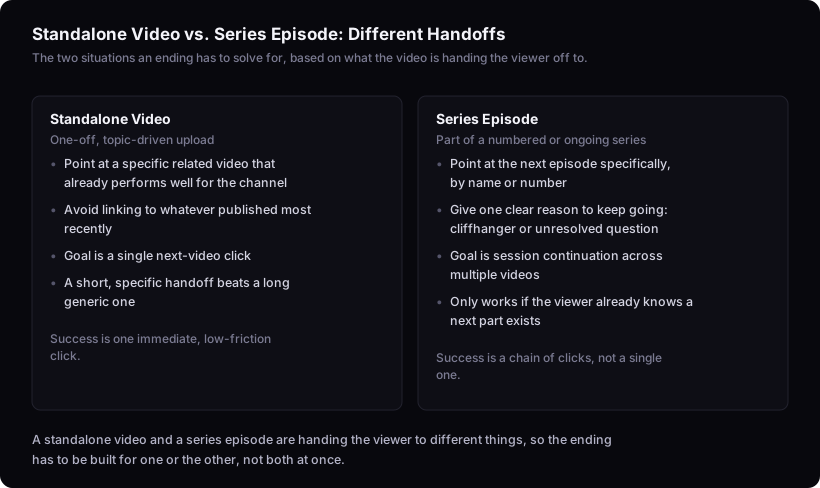
For a standalone video, the strongest move is pointing at a specific related video that already performs well for the channel — not a random recent upload. If you don't know which of your videos actually outperforms the rest, how to find outlier videos in your niche explains how to identify one relative to a channel's own normal, which is the version worth linking to rather than whatever published most recently.
For a series episode, the ending should point at the next episode specifically, by name or number, and ideally with a one-sentence reason to keep going — a cliffhanger, an unresolved question, a stated next step. The goal here isn't a single click, it's session continuation across multiple videos, which is a different signal than a one-off next-video click and worth treating as its own goal rather than a smaller version of the standalone case.
What this advice can't tell you
This reasons from YouTube's published documentation on suggested videos and retention, not from measured results on any specific channel. It cannot tell you which exact end-screen link, CTA wording, or outro length will convert best for your audience. That depends on your library, your audience's habits, and what's already performing for you — none of which a general method has access to. The only way to know is to check your own end-screen and retention data after publishing, and adjust from there.
Next step
Before you finalise this ending, check it against the three pieces from the top of this article: one named destination, one sentence connecting it to this video, and a length that matches how much runway the video has left. If any of the three is missing, that's the part to fix before publishing — not the wording of the CTA. What to check before publishing a youtube video covers the rest of the video. If you're scripting the next one from scratch, the script writer can help draft the handoff beat alongside the rest of the outline rather than as a separate step.