A video that used to bring in views and now doesn't is not the same problem as a video that never got views at all. The first thing to work out is which of three things happened: the packaging was weaker than the early numbers made it look, the video was riding a moment that's now over, or something newer — yours or a competitor's — took its slot. Each has a different fix, and the fix for one can actively waste effort on another.
Is this decay or a real problem?
Most videos taper. A video gets pushed hard in the days after upload, gets its highest velocity in that window, then settles into a slower trickle as it's shown to a narrower, more specific audience. That slowdown by itself is not a signal anything is wrong — it's the normal shape of a video's life on the platform.
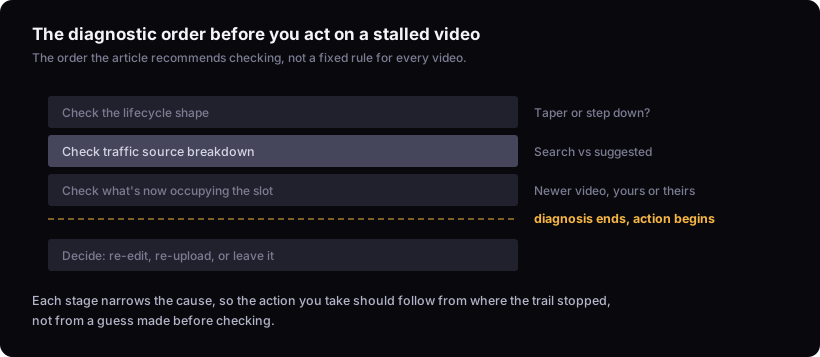
What's worth investigating is a video that was stable at some ongoing rate and then dropped sharply off that rate, not one that simply slowed from its launch spike. Pull up the video's performance over its full lifetime, not just the last week, and look for a step down rather than a gradual curve. A gradual curve is lifecycle. A step down at a specific point is worth asking why.
Search traffic and suggested traffic fail for different reasons
A drop concentrated in search traffic and a drop concentrated in suggested or browse traffic point to different causes, and mixing them up is why "fix the thumbnail" gets applied to videos where the thumbnail was never the issue.
Search traffic depends on the video still matching what people are typing in relative to everything else that also matches. If your video answered a query well for months and then stopped showing up for that query, something changed about the competitive set for that query — not necessarily about your video.
Suggested and browse traffic depends on the video still looking like a good next watch to viewers who are already engaged with something adjacent, which is a judgement made fresh each time rather than a fixed ranking. A video that was being suggested heavily can simply stop being the best match for that slot without anything about the video itself changing.
Check YouTube Studio's traffic source breakdown for the video, not just for the channel, and look at whether the drop lines up with one source or across all of them. A drop across every source at once usually means the audience for the topic has moved on. A drop concentrated in one source narrows the question a lot.
Something else may have taken the slot
If the falloff is concentrated in search, check whether a newer video — yours or someone else's — is now ranking for the same query the older video used to answer. Search the query yourself and see what surfaces near the top. If it's a video published after your falloff started, that's a strong candidate: the query wasn't retired, it was reassigned.
If the falloff is concentrated in suggested, the equivalent check is harder because you can't directly see what a viewer was offered instead. What you can do is look at whether you or close competitors published something covering very similar ground around the time the drop started. A newer video on the same topic, especially one with better retention, is often preferred for the same suggested slot simply because it's newer and unproven videos get tested there first.
This reframes the diagnosis from "this video broke" to "something else is now winning the same competition." That distinction matters because it changes what you'd even try to fix — there's often nothing wrong with the original video to fix.
Should you re-edit the title or thumbnail on a live video?
Only if the traffic-source check points at packaging specifically, and even then, treat it as a real gamble rather than routine maintenance.
A title and thumbnail that pulled in views for months were doing their job under whatever click-through rate the video was already earning against its impressions. Changing them resets that relationship — you can find out whether they've stopped working the same way you'd check them originally, which is by considering how what is a good click-through rate on youtube? actually gets judged: relative to a video's own history, not a fixed number. If the impressions-to-views ratio hasn't moved, the packaging probably isn't the failure point, and a new thumbnail is solving a problem that doesn't exist. You can see this pairing directly in youtube impressions vs views: what the pair actually tells you.
The risk of re-editing a live video is that a title or thumbnail change can also change what a video shows up for, since both are part of what tells the system what the video is about. On a video that's still getting some traffic, that's a live audience you could disrupt for a fix aimed at a problem the data hasn't actually confirmed.
If you do change it, the same bar applies as it would to a brand new upload: a workable title states a clear premise while leaving something open, and a workable thumbnail has to read almost instantly at real feed size. Editing an established video's packaging without meeting that bar just adds risk without adding the thing that was supposed to fix it.
Is a re-upload or a new version worth it instead?
Usually the new version, not a re-upload. Re-uploading identical or near-identical content to dodge a slump risks looking like duplicate content and starts the video over from zero trust with no guarantee the same slump doesn't recur for the same underlying reason.
A genuinely new video on the same topic is a different proposition: it can improve on what the retention graph showed was weak in the original, without gambling the traffic the original still has. Checking how to read your youtube retention graph on the original before you script the new one tells you where viewers actually left, which is a better brief than "make a new thumbnail."
Before committing real production time to a second attempt at the same topic, it's worth checking whether the topic itself is still working elsewhere or whether the whole format has cooled. how to tell if a youtube video format is worth copying covers how to separate a format still earning attention from one that already ran its course.
When to leave it alone
If the video's lifetime performance still sits well above your channel's normal range for a video its age, it has probably already done its job and doesn't need rescuing. A video's status as a real outlier is judged against a channel's own baseline, not against how it's doing this week, and a video that's cooling from a strong result is not the same as a video that failed. what is an outlier video on youtube? covers how that comparison works.
A stalled video is also not worth acting on if the drop lines up with an obvious calendar or news event that drove the original spike — a trend, a season, a story that was live and now isn't. That traffic isn't coming back regardless of what you change on the video, because the thing that fed it is gone, not the video.
The better use of the time in both cases is the next video. Consistency in output matters less than the strength of the idea, title, thumbnail and video itself — cadence should bend to protect those, not the other way round.
What this can't tell you
None of this replaces pulling the specific video's own traffic-source breakdown and retention graph. General patterns can tell you what to check and how to read it; they can't tell you, without your data in front of you, whether your particular video's drop was packaging, a passed moment, or a competitor. That diagnosis only happens once you've looked. If you want a structured pass at it, the video teardown runs the traffic-source and retention checks described here against your own numbers.