Repurposing a YouTube video means taking a topic, a clip, or a structure that already exists and rebuilding it for a different format or surface — Shorts, a second long-form video, another platform. It does not mean re-uploading the same title and thumbnail somewhere else and hoping the performance follows. That's the part most guides skip, and it's the part that decides whether the repurposed video does anything at all.
The common failure isn't laziness — it isn't that someone cut too few clips from the source. It's treating repurposing as copy-paste: the title, thumbnail and hook that worked in the original context get pasted onto a new surface with different discovery mechanics, and they die there because they were never built for that surface.
What repurposing actually changes vs what it keeps
Some parts of a video travel across formats intact. The topic travels. The proof points — the demonstration, the before/after, the specific claim that made the video worth watching — travel. The structural beats, if the original had a clear one, often travel too.
The parts that don't travel are the parts built for a specific discovery mechanism: the title, the thumbnail, the hook, and the length. A title written to match a search query works because it matches a search query — put it on a Short that lives in a feed-scroll environment and the query-matching does nothing, because nobody typed a query to find it. A thumbnail built to win a click among search results competes with different neighbors than a thumbnail that has to survive a swipe.
Treat repurposing as two separate jobs. Job one: carry the substance forward unchanged. Job two: rebuild the packaging from zero for wherever it's landing, as if you were titling and thumbnailing a brand-new upload — because for discovery purposes, that's what it is. What to check before publishing a YouTube video covers the general pre-publish pass this second job needs.
Diagnose why the source video worked before you cut anything
Before repurposing a video, work out whether its performance came from the packaging pulling the click or the content holding the watch — because that answer decides what you're allowed to reuse.
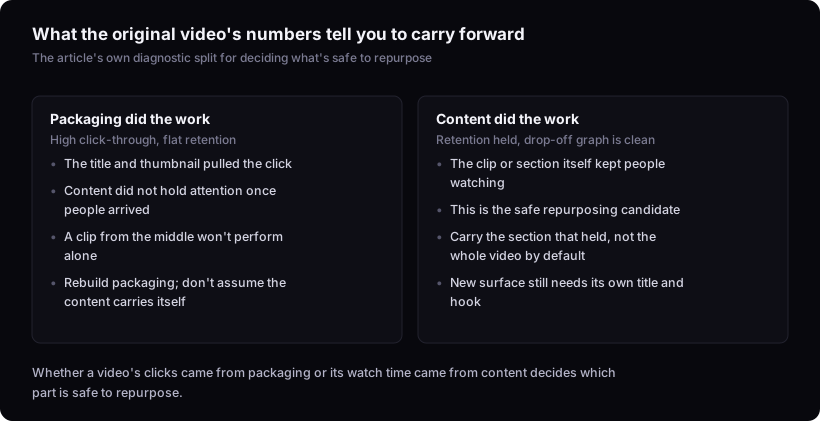
If a video's click-through rate was strong and retention was mediocre, the title and thumbnail did the work, not the content. Repurposing that video by lifting a clip from the middle and expecting it to perform on its own is repurposing the wrong asset — the clip was never the reason people watched. What is a good click-through rate on YouTube? explains why there's no single number to benchmark this against, but the direction — CTR high, retention flat versus CTR modest, retention strong — is the useful signal regardless of where the absolute number sits.
If retention held and the drop-off graph is clean, the content itself is doing the work, and that's what's safe to carry into a new format. How to read your YouTube audience retention graph is the tool for finding exactly where a video kept people and where it lost them — the section that held is your repurposing candidate, not the whole video by default.
This diagnosis is the entire argument of this article: repurposing decisions should follow from why the original worked, not from which parts are easiest to cut.
Repurposing long-form into Shorts: what has to change
Turning a long-form video into a Short requires rebuilding the hook and framing, not just trimming footage, because Shorts and feed surfaces run on different discovery logic than search-driven long-form.
A long-form video found through search already has intent behind the click — someone typed something close to the title. A Short in a feed has none of that. Nobody searched for it; it has to earn attention from a scroll with no prior intent attached. That means the opening beat can't lean on the same clarity-plus-curiosity title logic that worked in a search result — it has to do the entire job of stopping the scroll in the first fraction of a second, visually and verbally, before the viewer has decided anything about the topic. Why your YouTube Shorts aren't getting views goes into what that feed-scroll mechanic actually demands from a hook.
Length compounds this. A retention curve that looks healthy at eight minutes doesn't translate proportionally to sixty seconds — the pacing that held attention in long-form was calibrated for a viewer who'd already committed to watching. A Short needs its own pacing built for a viewer who hasn't committed to anything yet.
Repurposing into another long-form video
Turning one video into a follow-up, a deep-dive, or an updated version aimed at search means the new title and description need to match a different query intent — not reuse the old metadata with a "part 2" tacked on.
This is a search-to-search move, so the discovery mechanic doesn't change the way it does with Shorts — but the query does. If the original title matched "how to do X," a follow-up aimed at "why X didn't work" or "X vs Y" needs to be titled and described for that new query, built independently rather than inherited. How to title a YouTube video (with working examples) covers title construction for a fresh upload, which is the right frame here — treat the follow-up as its own video with its own title problem to solve, not an appendix to the first one.
The thumbnail needs the same independent treatment. How to make a YouTube thumbnail that gets clicks is worth revisiting for the second video specifically, because a thumbnail that looked distinct next to the first video's thumbnail might not look distinct next to everything else currently ranking for the new query.
Repurposing a video that flopped
An underperforming video is often a better repurposing candidate than a hit, if the topic was sound and the packaging was the problem — because repurposing here is a packaging fix, not a way to squeeze more out of something that already worked.
The diagnostic step matters more for a flop than for a hit. If retention on the original was strong but the video never got clicked — low impressions or low click-through despite people watching once they arrived — the content did its job and the title and thumbnail didn't. That's a case for keeping the substance and rebuilding only the packaging, possibly under a completely different title angle. YouTube impressions vs views: what the pair actually tells you is the way to tell whether a flop was a discovery problem or a genuine disinterest problem before you decide it's worth another attempt.
If retention was also weak, the problem probably wasn't packaging. Repurposing a video with weak retention just moves the same content problem to a new surface with a new title on top of it.
Checklist before you publish the repurposed version
Run this pass before publishing so the new upload gets treated as its own video, not a leftover cut of the original:
- Title written fresh for the destination format and its query or feed logic — not inherited from the source, per how to title a YouTube video.
- Thumbnail built and tested at the size and context it will actually appear in, not judged against the original thumbnail's performance.
- Hook re-timed for the new format's attention curve — a Short's opening second is not a scaled-down version of a long-form intro.
- Description and metadata matched to the new video's own likely search intent, not copied from the source.
- Retention section chosen based on where the original held, not on what was easiest to cut, using how to read your YouTube audience retention graph.
- A gut check on whether the format itself is even worth repeating before investing more into it — how to tell if a YouTube video format is worth copying covers that judgement.
What this can't tell you
This reasoning follows from how YouTube documents search, suggested, and impressions-to-CTR behavior in public form, and it can tell you what to rebuild and why for a given surface. It cannot tell you in advance whether a specific repurposed video will perform. That depends on audience overlap between the original viewers and the new surface's audience, and on platform-specific behavior that varies by channel and that nobody outside the channel has data on. Diagnosis narrows the guesswork. It doesn't remove it.