The Community tab sits alongside your uploads on your channel page and in the app, and it opens up once a channel meets YouTube's eligibility bar for it. From there you can post plain text, a poll, a single image or a multi-image set, a GIF, or a link — no editing software required, and no production time beyond writing or picking the image. Most guides stop at listing those formats and suggesting you use them to stay visible between uploads: a poll for fun, a behind-the-scenes photo, a meme. Those uses are legitimate. There's a second use worth knowing about once the basics are covered: the same poll and image-post formats can check whether a title phrasing or thumbnail concept lands with people who already know your channel, before you commit that idea to a full production.
What a community post can and cannot tell you
A community post can tell you how your existing subscribers react to a specific piece of packaging. It cannot tell you whether that packaging will pull in anyone who hasn't already subscribed.
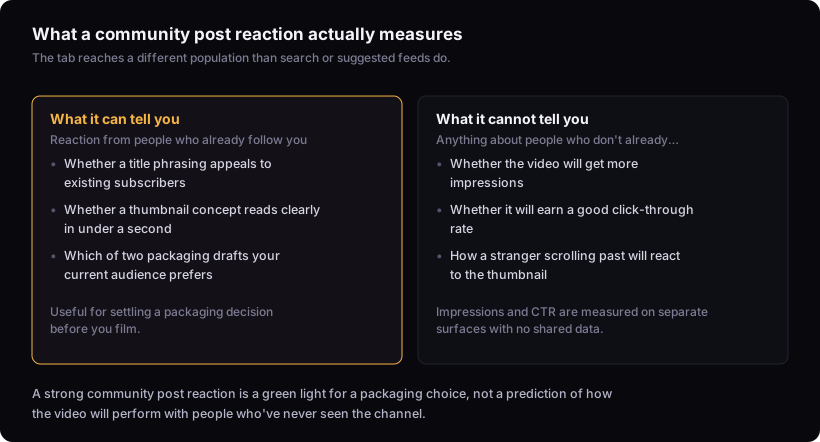
Community posts are built to reach subscribers first — they surface in the subscription feed and notifications in a way an upload does too, but without a companion appearance in search or suggested results the way a video has. That makes the audience reacting to a community post mostly people who already follow the channel, rather than the mixed cold-and-warm audience a video's impressions come from. That's a different population from the one that finds a video through a search result or a suggested-feed slot next to a channel they've never watched, which is why a strong reaction here answers a narrower question than "will this get clicks."
Using polls and images to pre-test a title or thumbnail
The concrete method is simple: post two versions of the same idea and read which one your audience reacts to before you shoot anything.
For a title, this can be a poll with two phrasings of the same premise as the options — plain text is enough, you don't need graphics. For a thumbnail, post two draft concepts as images (even rough ones) and either run a poll or watch which one gets more comments and likes. This works because the title pattern we trust most is clarity plus curiosity — the premise stated plainly, one outcome withheld — and testing two phrasings against each other tells you which one does that better for your specific audience. The same logic covers thumbnails — our check gives a thumbnail under a second at feed size — so if a draft concept needs explaining in the caption before people understand it, that's the same problem it will have live, just cheaper to catch now. If you haven't landed on a workable title yet, the deeper method for how to write youtube titles that get clicks covers the shapes worth testing in the first place. The same applies before you've built the visual: how to make a youtube thumbnail that gets clicks walks through building a concept worth putting in front of a poll.
Why a strong reaction here doesn't guarantee views
A community post getting strong engagement tells you your current subscribers like the idea. It does not tell you the video will get more impressions, and it does not tell you the video will get a good click-through rate once it has them.
Impressions and click-through rate are both measured against people who saw a thumbnail in a feed or search result and either clicked or didn't — largely people encountering the video cold, not people who already follow the channel. A poll reaction and an impression/CTR figure come from different kinds of exposure — one from people who chose to follow the channel, the other from a cold or semi-cold feed decision — so a poll result isn't a stand-in for either number. If the difference between the two metrics isn't already second nature, youtube impressions vs views: what the pair actually tells you breaks down what each number is actually counting. The same gap applies to click-through rate: a community poll answers a taste question for an audience that already trusts you, not a discoverability question for people who don't. If you're chasing a number to compare against, what is a good click-through rate on youtube? explains why that number is more contextual than most advice admits.
Other legitimate uses: updates, behind-the-scenes, re-engagement
Community posts also work for the things most guides already tell you: schedule updates, behind-the-scenes glimpses, and nudging inactive subscribers back toward a new upload. None of that is wrong, and it's worth doing.
An update post ("next video drops Thursday") keeps subscribers oriented between uploads. A behind-the-scenes photo or a process note gives people who already like the channel a reason to check in without a full video's worth of production behind it. A post timed around a quiet week can re-surface the channel to subscribers who haven't opened a notification in a while. These are the baseline use of the tab — the thing to reach for regularly, since they cost little and keep an existing audience engaged. The packaging test is a narrower, occasional use layered on top, for the specific moments when you're actually torn on a title or thumbnail.
How often to post relative to your upload schedule
There's no fixed ratio of community posts to videos worth following blindly — the right cadence is bounded by what doesn't cost you production quality, not by a schedule.
The rule we work by: consistency beats an arbitrary frequency, and quality beats consistency — the right publishing pace is the fastest one sustainable without weakening the idea, title, thumbnail or the video itself, and that principle applies just as much to community posts as to uploads. In practice this means posting a pre-test whenever you actually have a packaging decision to make — a title you're torn on, two thumbnail drafts — rather than on a fixed interval. A poll posted because the calendar said "community post day" with nothing real riding on the answer trains your audience to stop paying attention to them. If upload cadence itself feels like the open question, how often should you upload to youtube? a diagnostic covers that separately from what you post between videos.
Turning post reactions into a video decision
The reaction data is only useful if it changes what you actually make — a poll result should settle a specific fork, not just generate a number to feel good about.
If one title phrasing gets a poll split that holds once voting has slowed rather than just an early lead, use it, and treat the losing option as evidence about phrasing for the next idea too. If a thumbnail concept gets flat engagement compared to its alternative, don't ship it as-is — either it failed the one-second read or the premise wasn't clear, and reworking it before filming costs nothing compared to reworking it after. If reaction is close even after the split has stabilized, treat that as a signal that neither version has a strong pull with your existing audience — pick the stronger of the two and move on rather than running further rounds indefinitely, since the point is to reach a decision, not to keep testing. What you shouldn't do is treat a strong reaction as a green light for expected views — it's a green light for going ahead with that specific packaging choice, nothing more. If the underlying idea itself is shaky rather than just the packaging, it's worth stepping back to how to find youtube video ideas before spending a poll on phrasing for something that shouldn't get made at all.
The limit: this doesn't predict discovery
Use the tab to settle packaging questions among people who already trust you. Don't use it to predict how strangers will react to a thumbnail they've never seen before.