Write the premise of your video in one plain sentence, then swap the ending for a pointer to it. That is a title. If your video is about a diet that failed, "30 Days of Keto" is the plain sentence. Replacing the ending with a pointer to it gives you "30 Days of Keto (What the Blood Work Said)" — the premise is instantly clear, the result is withheld. That single move, state the premise plainly and swap the outcome for a pointer to it, is the pattern behind most titles that work, and it works whether you're chasing search traffic or browse traffic, though not in exactly the same way.
Below is the process for writing one now, followed by the two jobs a title does and how to tell which one yours needs.
Write the title now: the five-minute version
Start with a plain description of what happens in the video. Not a hook, just the fact: "I compared three budget tripods," "my sourdough starter died twice before it worked," "switching to a 4-day workweek cut my output by a third." That sentence sometimes needs no more than a shape applied to it, as in the tripod examples below — but often it needs one more move: naming the shape, then withholding the outcome that the plain sentence would otherwise give away.
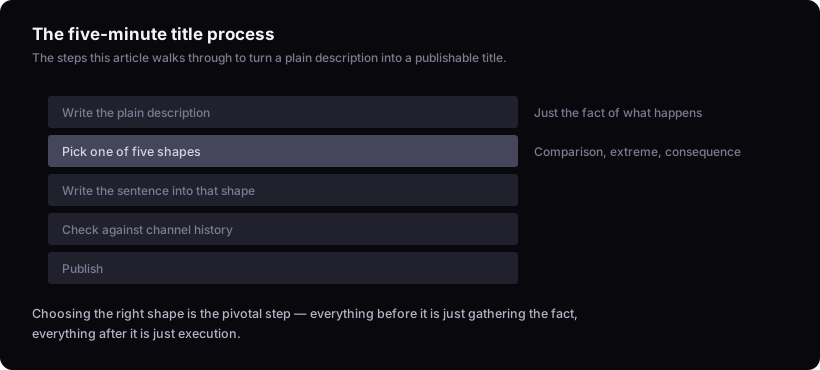
From that sentence, pick one of five shapes that reliably hold up: comparison, extreme, consequence, contradiction, transformation. Take the sourdough example above: "my sourdough starter died twice before it worked" becomes a consequence shape ("I Killed My Sourdough Starter Twice — Here's What Finally Worked") or a transformation shape ("My Sourdough Starter Died Twice Before It Rose"), depending on whether you want to emphasize the action taken or the arc from failure to success. When a plain sentence fits more than one shape, the tiebreaker is which word in your sentence is doing the work: if it's a verb ('died,' 'switched'), lean consequence or extreme; if it's a state change ('before/after'), lean transformation. A sentence with no comparison, no extreme, no clear before/after, and no real conflict — a plain status update with nothing withheld — doesn't fit any of the five, and forcing one on it produces a false hook.
| Shape | What it does | Example |
|---|---|---|
| Comparison | Sets two things against each other, withholds which won | Budget Tripod vs $400 Tripod: I Filmed the Same Shot on Both |
| Extreme | Pushes a variable to its limit, withholds the result | I Only Used a $20 Tripod for a Month |
| Consequence | States an action, withholds what followed | I Filmed a Wedding on a Tripod That Cost $20 |
| Contradiction | States something that seems to conflict, withholds the resolution | I Thought My $20 Tripod Would Ruin the Shoot |
| Transformation | States a before/after, withholds the middle | My Shaky Footage Before vs. After I Bought a $20 Tripod (Not What I Expected) |
Pick the shape whose 'what it does' column matches your sentence structurally: two things being weighed against each other is comparison, a variable pushed to a limit is extreme, an action followed by a result is consequence, two facts that seem to conflict is contradiction, a state that changed is transformation. Don't pick contradiction just because it sounds punchier if your sentence has no actual conflict in it. Then write the plain sentence into that shape, read it back, and then check it against your own channel's past uploads: has a title of this same shape (comparison, extreme, consequence, contradiction, or transformation) run notably above your channel's usual view range before? How to find outlier videos in your niche covers how to identify those past outliers in more detail. If a matching shape has worked on your own channel before, you have more than a guess; if you have no such history yet, treat the shape choice as your best structural bet and revisit it once you do. If you want a faster first pass at options in this shape, the title generator will produce several to react to; you still have to pick the one that's true to the video.
That's a title you can publish today. The rest of this article is about which of the two jobs to write it for, because the shape above serves both, but the wording inside it should lean differently depending on where the video's views will actually come from.
The title has two separate jobs, not one
A title earns a search ranking by matching what someone typed, and earns a click by pairing with the thumbnail once it's already showing on someone's screen. These are different mechanisms. YouTube's own Creator Academy documentation describes titles and descriptions as part of what helps a video surface in search, and separately describes the title-thumbnail pair as what earns the click once impressions happen. A title tuned hard for one job can actively lose the other: pack it with search terms and it reads flat in a home feed; write it as a pure curiosity hook and it may not contain the phrase anyone searched.
Most videos live mostly on one side of this, and the rest of this article helps you tell which side yours is on.
There's no benchmark number for a good title, so "good" has to mean something else
Nobody, including YouTube, publishes a CTR figure that separates a good title from a bad one, and any number you find quoted online for "good CTR" is not sourced to anything YouTube has stated. That absence isn't an oversight. A title's click performance depends on the channel's existing audience, the topic's competitiveness, and the thumbnail it's paired with — three variables that make a single global number meaningless. A title that pulls a strong response on a 5,000-subscriber cooking channel and the same wording on a 500,000-subscriber tech channel are not comparable events.
What is comparable is a title against that same channel's own recent normal. If a new upload's views run well past what that channel usually gets, the title (paired with its thumbnail) probably had something to do with it. If you want the fuller method for judging that, what is an outlier video on YouTube? covers how to read a channel's own baseline rather than an external score.
Writing for search: match the query, don't decorate it
A search-facing title works by containing most of the same words someone would type, arranged as a sentence a person would actually write, even if it doesn't match the query string exactly. If the query is "how to fix a wobbly office chair," a title like "Office Chair Wobbling? Here's the Actual Fix" carries the same core words — office chair, wobbling, fix — as a sentence rather than a keyword string. "Office Chair Wobble Fix Repair Tutorial Guide" contains the same keywords stacked with no sentence around them, and it reads like it was written for a crawler, because it was.
The test: read the title out loud. If it sounds like something you'd say to a friend who asked the question, it's search-shaped correctly. If it sounds like a list of nouns, it isn't.
Tags don't rescue a title that fails this test. YouTube's Creator Academy documentation treats tags as a minor signal for matching a video to search and browse, with the title, description, and video content itself doing the primary matching work. Stuffing keywords into tags while leaving the title vague is optimizing the part that matters least. If you're deciding whether tags deserve any of your remaining setup time at all, that's covered directly in why your YouTube videos aren't getting views.
Writing for suggested and browse: clarity, then one open question
A browse-facing title has no query to match against, so it has to work purely on the pairing with its thumbnail inside a fraction of a second of attention. The shape that holds up here is clarity plus curiosity: state the premise so plainly that a viewer gets it instantly, then leave exactly one thing unanswered.
What fails here, repeatedly: titles that are vague ("You Won't Believe This"), titles that try to be clever instead of clear (a pun that requires already knowing the punchline), and titles stuffed with more than one hook at once ("The Insane $20 Tripod Secret Nobody Tells You (Shocking Results!)"). Each of these either gives the viewer nothing to grab onto or gives them too much to parse in the time a thumbnail actually gets. A useful cross-check: look at the title next to its thumbnail at real size on a phone, the way it will actually appear in a feed, not blown up on a desktop preview. If the pairing takes more than a glance to understand, it's too complicated for where it's going to live.
For the fuller mechanics of pairing a title with its thumbnail as one unit rather than two separate decisions, the rest of the upload page covers that handoff.
Deciding which job to prioritise
Look at where the video's views are actually going to come from before you decide which job the title serves. A tutorial answering a specific, searchable question ("how to remove background noise in Audacity") should lean search: use the real phrase, keep it a sentence, resist the urge to make it cute. A story-driven or opinion video with no natural search query behind it ("I quit my job to fix bikes") should lean browse: clarity plus one open question, no attempt to stuff in keywords nobody's typing.
Most channels aren't purely one or the other. If you're unsure, check where your channel's traffic sources actually sit in YouTube Studio — that tells you more than a guess about your niche does. If you genuinely can't tell which job a video needs, write the title toward browse first — but check it against the actual query words afterward, since a natural-sentence title can still miss the phrase someone searched, and losing search traffic is a real cost, not a minor one, while a title built purely for search keyword density rarely survives being seen out of context in a feed.
Where this method stops working
This reasons from YouTube's published documentation and general observation of which title shapes recur across channels, not from testing specific titles on a live channel and not from measured CTR or search-ranking data. Nothing here can tell you which exact title wins for your specific video before you publish it — only how to structure that decision and what to check against afterward. A title that fits every rule above can still underperform, because a title is one part of a package that includes the thumbnail, the topic's demand, and the moment you upload it. Judging it against your channel's own past outliers, not against a formula, is the only honest check available. For the process of writing several options and stress-testing them before you commit, writing the title walks through that in more depth.
What if the title still doesn't work?
Give it time before concluding anything: open YouTube Studio's Analytics tab and check the video against its own impressions-and-CTR chart rather than the first-day number, since a video's click behaviour keeps settling as more impressions come in over its first days and weeks. A single day of data is too small a slice of that chart to read. Once it's had that time, compare its performance to your channel's own recent normal rather than to any external number, since that comparison is the only one that's actually meaningful. If it underperformed, the next check isn't a better title formula — it's whether the thumbnail matched the promise, whether the topic itself had an audience on this channel, and whether the upload competed against something in the algorithm's control on that day. Writing the title and how to write YouTube titles that get clicks both go further into troubleshooting a specific miss.