To add chapters, type timestamps into the video description, one per line, starting at 0:00, with at least three entries at least ten seconds apart, and YouTube will turn them into a clickable chapter bar automatically. The formatting rules are covered in full below, along with how to use the Studio chapter tool if you'd rather not edit the description by hand. Getting the syntax right is only half the job, though — where you place each break matters as much as whether the format is valid, and that's covered next.
The exact syntax YouTube requires to auto-detect chapters
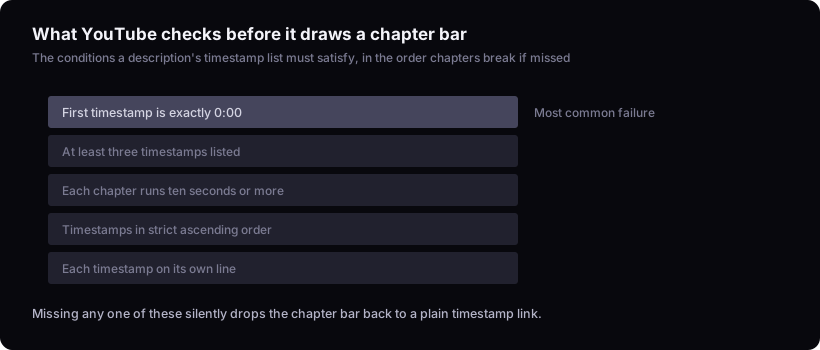
YouTube auto-generates chapters when you list timestamps in the video description, each on its own line, with the first one set to 0:00 and a short label after it. You need at least three timestamps, each chapter has to run at least ten seconds, and and the timestamps have to be listed in strict ascending order. A working example looks like this:
0:00 Intro
1:24 Setting up the project
5:10 The bug that broke everything
9:47 Final result
Paste the block above the top of your description — position elsewhere in the text doesn't stop it working, but keeping it together and near the top makes it easy to find later. Get the first line wrong — say, starting at 0:05 instead of 0:00 — and YouTube won't generate chapters at all; it'll just show a plain timestamp link instead of the scrollable chapter bar. Past the one-hour mark, write timestamps as 1:05:30 rather than 65:30. Save (or Publish, if the video is already live) and the chapter bar typically appears shortly afterward. The label text itself has no required format. Keep it short: a chapter bar on a phone truncates long titles, so aim for something close to a normal video title's length rather than a full sentence.
You can also add chapters without touching the description: in YouTube Studio, open the video from the Content list, go to the Editor tab, and select Chapters from the left-hand panel. Add a timestamp and label for each break the same way — first one at 0:00, at least three total, each at least ten seconds apart — and Studio writes them into the description for you when you save. The two methods produce the same result in the published video; use whichever surface you're already working in.
Where to place each chapter break using your retention graph
Chapter breaks belong right before the points where viewers already leave, not at arbitrary topic changes — which means the honest way to place them is to open your audience retention graph — Studio > Analytics > Engagement > the Audience retention card — and look for the drops before you decide anything. That graph only becomes readable once a video has enough views to show a real curve, and for a brand-new upload it doesn't exist yet: this method places chapters on a video that's already live and has some viewing history, not at the moment of upload. For a first upload with no data yet, place chapters at natural topic breaks and revisit them once the graph has something to show. If you don't know how to read that graph yet, how to read your youtube retention graph covers what the shape of a normal drop-off looks like versus a cliff.
The logic is simple once you see the graph: a chapter marker gives a skimming viewer a visible, clickable reason to jump past a section they're not interested in, rather than closing the tab entirely. If your retention line falls off a ledge at the four-minute mark, that's a strong signal the section starting around there is where people decide to leave. Place the chapter break at the point where that section starts — the last clean sentence or scene boundary before the drop — rather than at the exact minute-and-second the graph dips, so the label describes the section the viewer is about to bail on rather than splitting it in half. Label it honestly enough that someone scanning the bar can tell what they're skipping and choose to skip forward instead of out.
This only works if your chapters are drawn from real viewing behavior instead of guessed at from the script. A video split into "Intro / Main Point / Conclusion" segments viewers by structure, not by where they're actually struggling to stay. When a retention drop lands mid-sentence or mid-demonstration with no natural break nearby, place the chapter at the nearest point a few seconds earlier where a new sentence or shot starts — slightly early is better than splitting a thought in half.
None of this changes what average view duration measures on the video as a whole — chapters affect whether someone keeps watching past a specific point, but the underlying metric is calculated the same way regardless of how the video is segmented, which average view duration on youtube: what it actually measures explains in more detail.
Naming chapters like mini-titles, not scene labels
A chapter title has one job: make someone scanning the bar want to click into that specific section rather than skip past it. "Intro," "Part 2" and "The Build" tell a skimming viewer nothing about why that section is worth their time, which means they get skipped by default rather than chosen.
The fix is to write chapter titles with the same two ingredients a video title needs: the reader should understand what's in the section immediately, but still have a reason to click rather than assume they already know the outcome. "Fixing the first bug" is fine but flat. "The bug that broke everything" tells you it's still about a bug, and adds a reason to find out what "everything" means. This is the same clarity-and-curiosity approach covered in how to title a youtube video (with working examples) — a chapter bar is a smaller, faster version of the same scanning decision a viewer makes on a thumbnail, just one click deeper into the video instead of one click into it.
A title that gets cut off mid-word defeats the point of writing a good one, so keep the wording tight rather than descriptive.
Do chapters actually help you get discovered?
Chapters help viewers who are already watching decide what to do next; they aren't the mechanism that gets a video found in the first place. YouTube's Help Center documents chapters as a navigation feature tied to the description, separate from the title, thumbnail and description elements it identifies as what search and recommendations primarily use to surface a video. Chapter labels sit inside the description, so they're technically part of that text, but they're a minor structural element within it, not a separate ranking input.
Any search benefit from chapters is incidental — a chapter title that happens to contain a phrase someone searches for might get pulled into a snippet, but that's a side effect of writing clear labels, not a reason to write them. If you're trying to improve how a video gets found, the work that moves more is in the title, thumbnail, and the description itself, which how to write a youtube video description (method guide) covers directly. The same applies to tags: they're often assumed to carry more discovery weight than they do, which do youtube tags still matter? what they actually do now addresses.
They make a long video feel navigable, which can affect whether someone stays, without being a discovery mechanism in their own right.
Editing, updating and troubleshooting chapters that won't generate
Chapters can be edited any time after a video is published, and editing them doesn't affect existing view counts, watch time already logged, or any other historical analytics — you're changing a display element, not the video file or its recorded data. If a chapter placement turns out to be wrong after you've had time to watch how the retention graph responds, go back into the description or the Studio chapter tool and adjust the timestamps or labels directly.
If chapters aren't generating at all, the fault is almost always in the formatting rule from the first section. The most common causes:
- The first timestamp isn't exactly 0:00.
- Fewer than three timestamps are listed.
- Two timestamps are less than ten seconds apart.
- Timestamps aren't in strict ascending order.
- The timestamps are buried inside a paragraph rather than each on its own line.
Fix the formatting and the chapter bar should appear within a short time after saving — if it still doesn't, double-check the video is a regular upload, not a Short — YouTube does not support chapters on Shorts regardless of formatting. It's also worth running through what to check before publishing a youtube video before upload, since chapter formatting is an easy thing to get right in a draft and wrong after the fact.
The limit here
This article explains YouTube's stated formatting rules and a rule of thumb for using a retention graph to decide where breaks belong. Whether a given placement changes viewer behavior on a specific channel isn't something a general article can settle — the graph itself is the only way to check. Whether a given chapter break actually changes viewer behavior on your channel is something only your own analytics can answer, video by video. If you're also trying to keep viewers through to the end once chapters have gotten them past the weak middle section, how to end a youtube video (so it actually gets watched) covers the other half of that retention problem.