Your channel description has one job: turn a visitor already looking at your channel page or a search result into a subscriber. It is not a place to stuff keywords — that work happens in your titles and video descriptions instead.
A description that does this job has four parts in order: who the channel is for and what they get, a specific detail that proves it, how often you post, and a direct line asking for the subscribe. Here's how to write each one, followed by a full example.
What a channel description can and can't do for you
A channel description does not drive search ranking or suggested placement on YouTube. YouTube's own ranking signals center on title, thumbnail, and how well a video's content matches what a viewer searched for or is currently watching — the channel description isn't part of that matching. If you've been rewriting your channel description hoping it moves your videos into more search results, that effort is going to the wrong field.
What it does do: it shows up on your channel's About page, in the channel preview when someone hovers or taps into your channel from a video, and sometimes as a snippet under your channel name in search results. In every one of those places, a visitor already has some reason to be looking at you. The description's job is to close that decision, not create it. Confusing the two jobs is why so much channel-description advice reads like leftover tag advice with a different label.
The one-sentence test: what belongs in the first line
The first line has to state who the channel is for and what they get, because it's the only line that survives truncation. In a search snippet or a collapsed About preview, YouTube cuts the text short and shows "…more" — open your own channel's About page and preview card to see exactly where it lands for you, since this can differ by surface and by device. If that first line is a mission statement or a joke, the reader never sees the part that would actually tell them whether to subscribe.
Write the first line as if it's the only line anyone will read, since previews and snippets mean many visitors never see past it. Compare these two openings:
"Welcome to my channel! I'm passionate about sharing my journey and connecting with amazing people like you."
"Weekly teardown videos on how small YouTube channels grow — scripts, thumbnails, and the numbers behind what worked."
The second tells a stranger exactly what they'd be subscribing to. The first tells them nothing they didn't already know from clicking. If you can't summarize your channel in one plain sentence, that's worth fixing before you touch anything else about the description — it usually means the channel's premise itself needs sharpening, which is a niche question more than a copywriting one.
Structure that does the conversion job
A channel description that converts needs four things in order: who it's for and what they get, some proof or specificity, the upload rhythm, and a direct ask to subscribe. Here's each one, then a full example combining all four. Skipping any one of these leaves the visitor doing work you should have done for them.
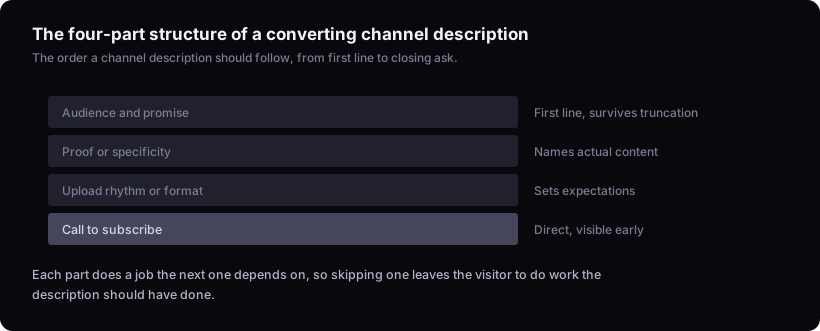
Audience and promise. The opening line, covered above. Specific enough that a stranger can self-select in or out within a few seconds.
Proof or specificity. A sentence naming the actual content — formats, topics, or the kind of result the videos deliver. "Deep dives into X" is vague. "Breaking down one product launch per episode, start to finish" is not. Specificity here does more conversion work than any adjective.
Upload rhythm or format. A short line on when or how often new videos land. This sets expectations and gives a returning visitor a reason to check back, but it's a statement of what you actually do, not a promise about a schedule you're not sure you'll keep — a schedule you can't sustain costs more than the missed video would have.
Call to subscribe. One direct sentence, placed where someone reading only the first two sentences will still see it, or repeated at the end if the description runs long. Keep it plain — "Subscribe for a new teardown every week" tells a visitor what they get by acting; "Subscribe if you want more" doesn't add anything the rest of the description hasn't already said.
Put together, the four parts read as one description:
"Weekly teardown videos on how small YouTube channels grow — scripts, thumbnails, and the numbers behind what worked. Each episode breaks down one real channel's growth, start to finish. New teardown every Tuesday. Subscribe to follow along."
That's one version, for one kind of channel. The same four parts hold whether the channel is gaming, education, or a business account — only the specifics in each line change.
None of this needs to hit a particular word count — there's no verified length threshold worth chasing here. What matters is that a stranger reading only the first sentence still gets the gist, and a stranger reading the whole thing gets a reason to act.
Where keywords actually belong instead
Keyword effort belongs in your titles, thumbnails, and per-video descriptions, not your channel description, because that's where YouTube's own documentation on video discovery says matching happens. This is the same lesson creators learned the hard way about tags — a field that felt like it should matter for search turned out to carry far less weight than the title and thumbnail sitting right next to it.
If you have a term you want a video to rank for, put it in the video title where it's genuinely relevant, and in the video description where it can accompany a real explanation of the content. That's covered in more detail in how to write a YouTube video description. The channel description is not that field. Stuffing it with niche keywords doesn't help ranking and actively hurts the one job the field can do, because a paragraph full of search terms reads like exactly that to a human visitor deciding whether to subscribe.
Common description mistakes that quietly kill conversion
The three recurring mistakes are a vague mission statement instead of a concrete promise, a subscribe ask buried too far down to be seen, and a description nobody has touched since the channel's first month. Each one costs conversions quietly, because nobody complains about a bad channel description — they just don't subscribe and you never find out why.
Vague mission statements ("I make videos about things I love") tell a visitor nothing they can act on. Buried calls to action assume a visitor will read the whole paragraph, when most read the first line and decide. And a stale description is another failure worth watching for — a channel that pivoted formats, narrowed its topic, or found its actual audience a year in in, still describing itself the way it did at launch. If your content has moved on and your description hasn't, it's actively misdescribing you to every new visitor.
When and how to revisit your description
In short: revisit the description when the channel itself changes — a niche shift, a rebrand, or a new primary format — not on a fixed calendar. There's no fixed cadence for rewriting it on a schedule. Instead, watch your last five uploads back to back and check three things against your description: does it name the same topic or format those videos actually cover, is the upload rhythm you claim still true, and would a stranger who read the description first be surprised by what they saw. If any answer is no, rewrite it — regardless of how long it's been since the last edit. If it doesn't, that's the trigger, regardless of how long it's been.
A practical moment to check: any time you do a competitor analysis or reconsider your niche, read your own channel description as if you were a stranger landing on it cold. If it describes a channel you don't run anymore, fix it then.
The limit here
This reasons from YouTube's help documentation on video discovery, not from testing different channel descriptions against each other. It also doesn't cover editing the field itself, adding links or timestamps, or how the description interacts with your channel banner and trailer — those are worth checking directly in YouTube's channel customization settings. It can tell you which job the description is built to do and what structure serves that job, but it can't tell you how much a specific rewrite will move subscriber conversion on your channel — that's only checkable by watching your own numbers after you change it. Before you touch the description, it's worth confirming the rest of your channel-facing basics are in order — see what to check before publishing a YouTube video for the adjacent checklist.