A video with almost no views is usually stuck at one of three points: nobody is being shown it, people see it and skip it, or people click and then leave before it earns further placement. There are other causes outside this frame — a policy flag limiting distribution, an unlisted or mistimed upload, a topic nobody is searching for, or a new channel with little audience base yet — so if the checks below all come back clean, look there next. But for a video that's otherwise normal and just isn't getting views, these three points are where to start, and the order you check them in matters: working on a thumbnail when the real issue is that nobody sees the thumbnail at all wastes the one thing you can't get back, the video's early window.
This article works through the three points in order — impressions, then click-through rate, then retention — and gives you a way to check each one against your own upload history so you can find which stage the video is stuck at.
Is YouTube showing the video at all?
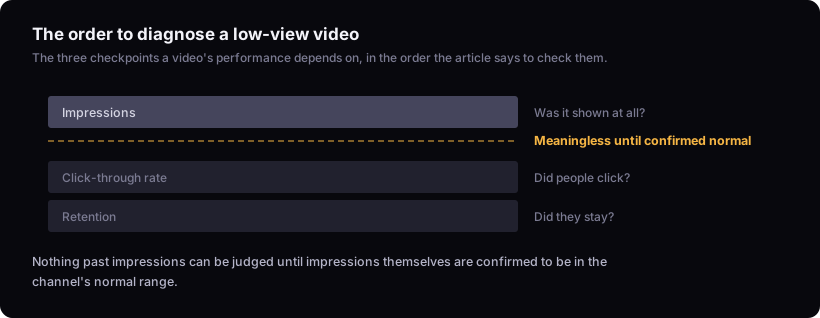
Start with impressions, which is the count of times the thumbnail was displayed to a viewer, whether or not they clicked. This is the first number to check because it tells you whether you have a distribution problem or something further downstream. If impressions are near zero, nothing past this point can be evaluated yet — a video with no impressions has generated no clicks to measure and no watch time to judge, so click-through rate and retention are meaningless until this changes.
In YouTube Studio, open Analytics, switch to Advanced Mode, and use the Reach tab, which lets you set a custom date range starting from each video's publish date. Pull up the video in question alongside your last several uploads, and compare impressions over the same number of days since publish for each — day 3 against day 3, day 7 against day 7, not final totals against final totals. If the new video's line sits within the spread of the others, impressions are not the cause and you move to click-through rate. If it's tracking noticeably lower and the video has been up only a day or two, give it a few more days before concluding anything: a video's early impressions can keep climbing for some time after publish, so a low count on day one is not yet evidence of a problem. If the gap is still there once the video has had roughly as many days as it takes your other uploads to reach their impression plateau, treat it as a real shortfall rather than a timing artifact.
If impressions stay low well past the point where your other uploads had climbed, the video isn't reaching enough of an audience for the system to have a click-through signal to act on. That's a distribution failure — the packaging hasn't been tested yet, because it hasn't been shown.
Why tags almost never explain low views
Tags are one of the least likely causes of a views problem. YouTube's own guidance on video metadata names title, thumbnail and description as what helps viewers decide to watch, and describes tags as a minor tool mainly useful for correcting common misspellings of your video's main terms. If you're staring at your tag list wondering whether it's the problem, it almost certainly isn't.
This matters for the order in this article because it rules out a whole category of "fix" that feels productive but changes nothing measurable. Time spent rewriting tags is time not spent on designing the thumbnail or writing the title, which are the two things YouTube's documentation actually names as decision points for a viewer.
Reading click-through rate without a fake benchmark
Click-through rate is the share of people who saw the thumbnail and clicked it — it's downstream of impressions, so it only matters relative to your own channel's normal, and only once impressions are already accounted for. YouTube publishes no official good or bad CTR number, and any specific percentage you find quoted as a universal benchmark is not coming from YouTube.
The only comparison that means anything is a video against that same channel's own recent normal. A CTR that would be disappointing on a large entertainment channel can be a strong result on a niche tutorial channel, because the audiences, thumbnails and expectations are completely different starting points. If a video's CTR is sitting well below your channel's usual range at the same age, the packaging — the thumbnail and title together — is the place to look, not tags, not upload time, not description.
On the thumbnail side, we check it at actual feed size on a phone and give it under a second — in that time we expect to know where the eye is meant to go, understand the visual premise, and feel some curiosity, and if it takes longer than that to read, the problem is complexity rather than the underlying idea. On the title side, we trust clarity paired with curiosity: the premise should be immediately clear while one question stays open, and we've found that comparisons, extremes, consequences and contradictions tend to hold up better than titles that are merely clever. There's a fuller breakdown of that pattern in how to write youtube titles that get clicks.
Clicks without watch time: why suggested and search can still drop the video
A video can clear both impressions and CTR and still fade, because YouTube's placement in suggested and search continues to depend on signals generated after the click — including how long people stay and whether they keep watching relative to other results serving the same query or slot. Getting the click is not the end of the evaluation; it's the start of a second one.
This is the failure mode that thumbnail and title work can't fix, because the packaging already did its job — it got the click. If a video is getting clicks in line with your normal CTR but views still stall, open the audience retention graph for the video. A steep drop in the first seconds often points to the opening — the video isn't delivering on what the title and thumbnail promised, or takes too long to get there — though it can also mean the click came from a mismatched source or placement rather than the video itself. A steady decline across the middle can point to pacing. A drop at a specific timestamp is worth watching back, since it can mark a moment viewers didn't expect or didn't want. The metric glossary covers how retention is measured if the terminology on your analytics page isn't clear.
Ruling out the schedule as the cause
Posting more often does not fix a views problem that traces to one of the three points above — it just produces more videos with the same unresolved issue.
Consistency helps, but only up to the point where quality holds. We publish at the fastest cadence we can sustain without weakening the idea, the title, the thumbnail or the video itself, and in our experience newer channels get more out of the extra reps than established ones do, since the reps are where the judgement that catches these problems actually comes from. If you're raising cadence and views are dropping, pull up the retention graphs and CTR for the videos posted since the pace increased and compare them against your normal range the same way as above — if either has slipped, that's the cause, not the schedule itself.
Is this video actually underperforming, or just early?
A low number in the first hours or days is not evidence of a problem on its own — every video starts at zero, and the comparison that matters is against your own channel's normal range at the same age.
A video sitting well below the channel's normal range for its age — measured well past the point where comparison uploads had already climbed — is the case this diagnostic is for; that channel-relative framing is the same standard we use to judge outliers in the other direction. What counts as 'well below' depends on the spread of that channel's own upload history rather than a fixed ratio; What is an outlier video on youtube? covers how to build that range. What matters is standing relative to that channel, not a raw view count that means something different on every channel. A video that's simply young hasn't had its chance yet. What is an outlier video on youtube? covers how to build that normal range from your own upload history.
The limit here
This diagnostic works from YouTube's public documentation on impressions, click-through rate and ranking, combined with the channel-relative comparisons described throughout — it is not a substitute for testing on your own videos. It can't hand you a CTR benchmark, because YouTube doesn't publish one, and it can't diagnose your specific video — only your own analytics, checked against your own channel's normal range, can do that. If you want a structured pass through a specific video's numbers instead of general causes, the video teardown walks through a single video's impressions, CTR and retention together. For the broader pattern of low-view videos across a channel, why your youtube videos aren't getting views covers causes beyond a single video's diagnostic window.
"