When your YouTube videos are not getting views there are four causes worth checking, they are distinguishable using data you already have, and they need different fixes. Working through them in order takes about twenty minutes and will usually land you on one.
Before that, one thing to rule out.
First, rule out the thing that isn't a problem
The video may be too young. Views arrive on a long tail, and a video that looks flat at 48 hours often is not. Compare like with like: a video published three days ago against other videos at three days old, not against their lifetime totals. Most people never do this, and it manufactures a crisis roughly every upload.
Your baseline may be wrong. If you are comparing against your best-ever video, everything will look like a failure. Compare against your own median — the middle value of your recent uploads, not the average, which one runaway video drags upward until nothing else clears it.
Do both of these first. A meaningful share of "my views collapsed" turns out to be one of them.
Four reasons YouTube videos stop getting views
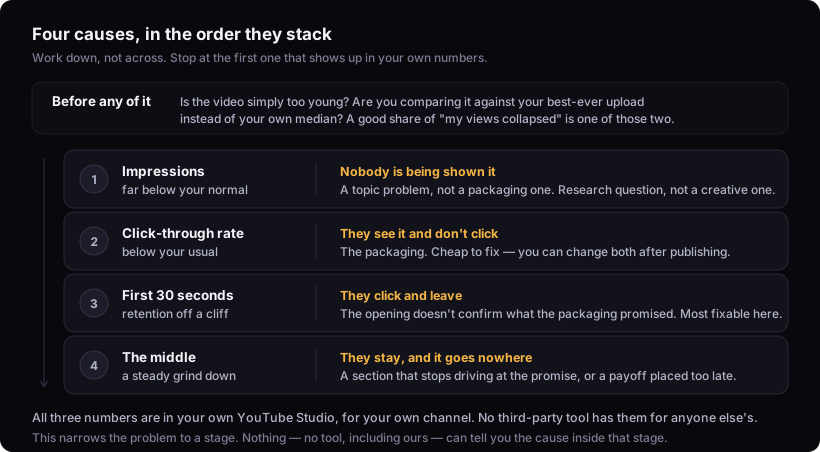
These stack, and that is why the order matters. There is no point rewriting a hook if nobody is being shown the video, and no point improving the middle if nobody clicks. Work down, not across, and stop at the first one that shows up in the data.
| Look at | If it is off | The cause |
|---|---|---|
| Impressions | far below your normal | Nobody is being shown it |
| Click-through rate | below your usual | They see it and don't click |
| First 30 seconds of retention | falls off a cliff | They click and leave |
| The middle of the retention graph | grinds steadily down | They stay, and it goes nowhere |
Cause 1: nobody is being shown the video
How to tell: open the video in YouTube Studio and look at impressions. If impressions are far below your normal, this is your cause — the video is not being offered to people, so nothing downstream matters yet.
What it usually means: the subject has no existing audience on your channel, or it sits outside what your channel has trained the system to associate with you. It is a topic problem, not a packaging problem.
What to do: this is a research question, not a creative one. Check whether anyone is looking for the subject before making the next one, and look at whether the topic has produced outliers on channels your size.
Cause 2: they are shown it and don't click
How to tell: impressions are normal, click-through rate is below your own usual.
What it usually means: the packaging. The title and thumbnail are not making a promise anyone wants, or they are making the same promise twice and wasting one of the two surfaces.
What to do: the fixes are cheap and reversible — you can change both after publishing. Check that the thumbnail and title complete each other rather than repeat, that the title survives truncation, and that it carries an actual emotional pull. Titles covers the method.
Cause 3: they click and leave
How to tell: click-through rate is fine, and the retention graph falls off a cliff in the first thirty seconds.
What it usually means: the opening does not confirm what the packaging promised, or it winds up slowly instead of starting mid-motion. The steepest drop on most retention graphs happens early, and it is the most fixable thing on this list.
What to do: watch your own first fifteen seconds and ask whether someone who clicked on that specific title would feel they were in the right place. If not, that is the whole problem. The hook formula covers the shapes that work.
Cause 4: they stay, and it goes nowhere
How to tell: the opening holds, then retention grinds steadily down through the middle.
What it usually means: the video stops delivering on its promise partway through. Usually a section that does not drive at the core question, or a payoff placed so late that people leave before reaching it.
What to do: find the timestamp where the decline steepens and watch the ninety seconds before it. The problem is almost always there, and it is almost always a section that could be cut. The script template covers the shape.
What nobody can tell you
Why a specific video underperformed. This article gives you a way to narrow it to a stage — impressions, click, opening, middle. It cannot tell you the cause within that stage, and neither can any tool, including ours. That answer lives inside YouTube's ranking systems and it is not visible from outside them.
Whether it was you at all. Sometimes a good video lands in a bad week, next to a news event, or against something else in your audience's feed. That is real and it is unmeasurable, and the honest response is not to over-correct on one upload.
Anything from a single data point. One video is noise. Three consecutive uploads showing the same pattern is a signal. Rewriting your whole approach after one disappointing Tuesday is the most common expensive mistake in this list.
Where the numbers come from
Impressions, click-through rate and retention are in your own YouTube Studio, for your own channel. No third-party tool has them for anybody else's channel, and any tool that appears to is modelling them.
What is visible from outside is how far a video beat its own channel's median, which is what PublishBench measures and labels — how our data works. Your own version of that comparison is on your scoreboard, and the same measurement pointed at channels you compete with is the watchlist.