Write YouTube titles in three passes, in this order: decide where the video will be found, choose the emotion it runs on, then model a structure that has already worked. Doing them in that order matters, because the first decision changes what a good title even looks like.
Most title advice skips straight to the third step and hands you a list of formulas. That is why the formulas so often produce something that reads well and performs badly — a title built for the home feed dropped into a search result, or the reverse.
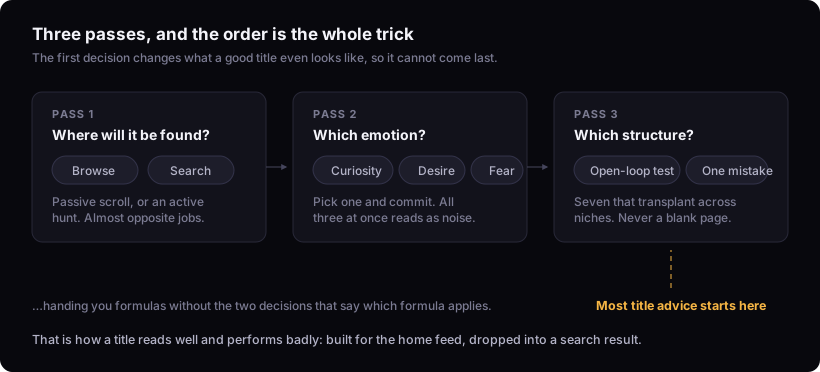
Step 1: browse or search
This is the decision everything else depends on, and almost nobody makes it consciously.
| Browse (home, suggested) | Search | |
|---|---|---|
| Viewer state | Passive, scrolling fast | Actively hunting an answer |
| The title's job | Interrupt the scroll and spark something | Confirm "this is exactly what I wanted" |
| Style | Curiosity-led, emotional, shorter, simple | Clear, direct, keyword-first, can run longer |
| Negative angles | Work well | Usually hurt |
| Example | If your Shorts get under 1,000 views, do this | How to start a YouTube channel in 2026 |
A browse title that spells everything out has nothing left to make anyone stop. A search title built on curiosity fails the only test that matters there — the viewer scanning a results page has to recognise their own question in your words within about a second.
Most videos are found in one or the other, not both. Decide which, then write for it.
Step 2: pick the emotion
Clicking is a fast, emotional decision rather than a reasoned one. The working model is that almost every title that earns a click runs on one of three:
- Curiosity — a question opened and not answered
- Desire — a stated outcome the viewer wants
- Fear — a loss they would rather avoid
Pick one deliberately and commit. Titles that try for all three read as noise, and titles that carry none read as a filename.
These three are the working model our title writer applies, drawn from craft that experienced creators teach publicly. They are not a published study and this article does not present them as one.
Step 3: model a structure
Never invent a title from a blank page. The reliable move is to take a structure that has already worked and fit your subject to it. Seven that transplant across almost any niche:
| Structure | Shape | Why it works |
|---|---|---|
| Open-loop experiment | I [did the thing] for [time] — here's what happened | The result is withheld and the effort is proof |
| The one mistake | This one mistake killed my channel | Withholds which mistake. Naming it closes the loop and kills the click |
| Extreme specificity | I flew 7,292 miles to eat here | A precise, odd number beats a round generality |
| Best [X] of [year] | Best trout lures of 2026 | Search-native, transplants into any subtopic |
| Counterintuitive pairing | Clear ketchup | Two words can carry a video if the concept is strange enough |
| Myth-busting | [Thing everyone believes] is wrong | Attacks something the audience already holds |
| Bold warning | Do this before [deadline] | Fear plus a clock. Use sparingly — it burns out |
The "one mistake" example is the one worth studying. This one mistake killed my channel opens a loop. Getting a copyright strike killed my channel answers it in the title, so there is nothing left to find out. Same information, opposite outcome.
The hard rules for writing YouTube titles
Once you have a candidate, run it against these.
- Under about 55 characters, 5–10 words. Longer gets truncated, and truncation eats the end of your sentence.
- Front-load the hook. Assume the last third is invisible; the title must still work without it.
- Avoid "and". A title with "and" is usually two videos that have not decided which one they are.
- One power word, not three. Stacked intensifiers cancel out.
- Keep the payoff withheld. If the title answers itself, the video has nothing to deliver.
- It must match the video. A title the body cannot pay off costs more than a dull one — you have brought people in to be disappointed at the point they realise.
Coordinate with the thumbnail
Title and thumbnail are one unit, and the most common failure is that they say the same thing twice. Two words on the image repeating four words in the title spends both surfaces on one idea.
The default is that they should complete each other: the thumbnail poses the situation, the title supplies the tension, or the reverse. Repetition is worth it only when the statement is strong enough that saying it twice is the point — which is rarer than it feels while you are making it.
Where this stops working
A title cannot fix a video nobody wanted. If the subject has no audience, a better title raises the click-through rate and the drop-off behind it. You will have improved one number and worsened the one that matters.
No one can tell you a title's click-through rate before you publish, including us. Anything that scores a title in advance is scoring its resemblance to titles that worked in some other context, on some other channel, for some other audience. Comparing eight structurally different promises is useful. A confidence score on one of them is not.
The rules above are craft, not measurement. They come from patterns creators teach publicly and from how the writer is built. Where PublishBench shows a measured figure it comes from the YouTube API and is labelled — how our data works.
Doing it on your next video
Write the promise in one sentence. Decide browse or search. Pick one of the three emotions. Then write three titles on three different structures from the table above — not three wordings of one — and read them out loud.
If you would rather compare more of them at once, the title generator labels each option with the mechanism it uses, so you are choosing between approaches instead of picking a favourite sentence. It caps at 70 characters rather than 55 — that is the ceiling before truncation, not the target, and the shorter rule above is still what to aim for. The full method, including what it will not do, is on writing the title.