Plan a content calendar by treating it as a sequencing tool for ideas you've already validated, not a way to generate or force them. Decide your sustainable cadence first, build a backlog of proven and fresh formats, then use the calendar to slot them in with room for timely opportunities.
Why the calendar is the wrong first step
A calendar with empty slots and a deadline creates pressure to fill those slots, and pressure does not discriminate between a strong idea and a weak one. The failure shows up two weeks later: a video went out because Tuesday said so, not because it was ready.
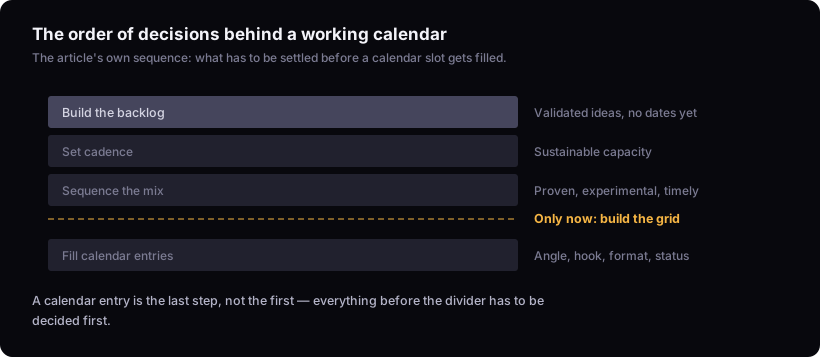
The calendar's job is to sequence decisions that already exist — which idea, which format, which week. It has no job in making those decisions. If you open a calendar template and the first thing you do is type dates into empty rows, you've built the structure before you had material to put in it.
Build the backlog before you build the grid
A calendar needs a pool of ideas that have already been checked against something, not a list of topics that sounded good in the shower. Before any slot gets a date, you need enough validated ideas sitting in a backlog that picking one is a five-minute decision, not a Sunday-night scramble.
Validated means the idea has some evidence behind it — a format that's worked before on your channel, or one that's shown up as a genuine outlier elsewhere. How to find YouTube video ideas and how to find outlier videos in your niche cover how to build that pool. Once you're looking at a candidate idea, what is an outlier video on youtube? explains what actually counts as a signal worth acting on rather than a lucky upload.
The backlog is not the calendar. A backlog is a list of ideas ranked by how strong they are, with no dates attached. A calendar takes items from that list and assigns them a week. Confusing the two is how creators end up scheduling an idea they aren't sure about just because the slot needs something.
Set cadence from sustainable capacity, not a round number
Cadence is a capacity decision, not a target. The right upload frequency is the fastest one that doesn't force a weaker idea, title, thumbnail or edit out the door to hit a deadline — publishing at a pace you can sustain without cutting corners on any of those beats picking a number because it looks tidy on a schedule.
That threshold moves depending on where you are. Newer channels get more value from higher reps, because reps are how judgement about titles, hooks and formats gets built in the first place. A channel with more history behind it has less to gain from an extra upload and more to lose if it means a rushed thumbnail. If you're unsure what your own ceiling looks like, how often should you upload to youtube? a diagnostic walks through how to work it out rather than copying someone else's schedule.
Set cadence before you fill a single slot. A calendar built around three uploads a week looks nothing like one built around one, and deciding this after the grid exists means redesigning the grid.
Sequencing: mixing proven formats, variety and timely slots
A calendar that's all one format burns out both you and the audience; a calendar with no proven format never builds a reliable base. The fix is deliberate mixing, not accident: reserve most slots for formats that have already worked, some for genuine experiments, and a few left loosely defined for whatever the news cycle or a trend hands you that week.
Proven formats are the ones with a track record on your channel or a track record you've independently verified elsewhere — how to tell if a youtube video format is worth copying covers how to check before committing a slot to it. These should fill most of the calendar, because they're the lowest-risk way to hit your cadence without gambling every week.
Experimental slots exist to test a new angle, format or premise you haven't tried. Fewer of these, but not zero — a calendar with no experiments never finds its next proven format.
Timely slots are the ones you leave unplanned on purpose. When something breaks in your niche and the window to cover it is measured in days, an empty slot lets you move. A calendar with every slot locked two months out has no room for the video that would have done best.
How far ahead to plan, and what a calendar entry should contain
Plan as far ahead as your cadence and format mix let you, and no further than that stays useful. A channel running one proven format a week can plan a month out with confidence. A channel mixing in experiments and timely slots should plan those further out only loosely — a placeholder, not a locked brief — because locking a timely slot defeats its purpose.
An entry needs more than a date and a working title. At minimum it should carry:
| Field | What it captures |
|---|---|
| Angle | The specific take, not just the topic |
| Hook direction | What the first line does, before the script exists |
| Format type | Proven, experimental, or timely/reserved |
| Status | Idea, scripting, filming, ready |
Without these fields, a calendar is a list of dates with no way to tell whether a slot is actually ready or just occupying a row. The angle matters most — finding an angle is what turns a topic into something with a hook, and a slot with a topic but no angle isn't ready no matter what the date says.
What a content calendar cannot do for you
A calendar organises decisions. It does not make them. It cannot generate an idea, tell you whether that idea will work, or fix a video that has a weak hook, a cluttered thumbnail, or a title that doesn't state a clear premise. Filling every slot on schedule with ideas nobody checked produces a channel that publishes reliably and says nothing worth watching.
If the backlog feeding your calendar is thin, the fix is upstream of the calendar, not inside it — building better ideas, not building a better grid. The ideas can help widen that backlog, and if the real problem is that your topic focus itself is unclear, how to find your youtube niche (without guessing) is a better place to start than another calendar template.
Once the backlog and cadence are settled, the calendar itself should take an afternoon to build. If it's taking longer than that, the problem usually isn't the calendar.