A YouTube channel trailer is a video you designate, in your channel's customization settings, to play automatically for people who visit your channel page and are not subscribed. It is not a regular upload and it is not a "channel intro" in the generic sense — it has one job, aimed at one audience: convince someone who has never watched you before that this channel is worth subscribing to. Everything below follows from that narrow job, including why you cannot measure whether it's doing it.
What a channel trailer is for, and who actually sees it
A channel trailer only shows to visitors who land on your channel page and are not already subscribed. Subscribers who visit your channel page see a different featured video, or nothing pinned at all, depending on your settings — they don't see the trailer. That single fact should decide almost everything else about how you make it.
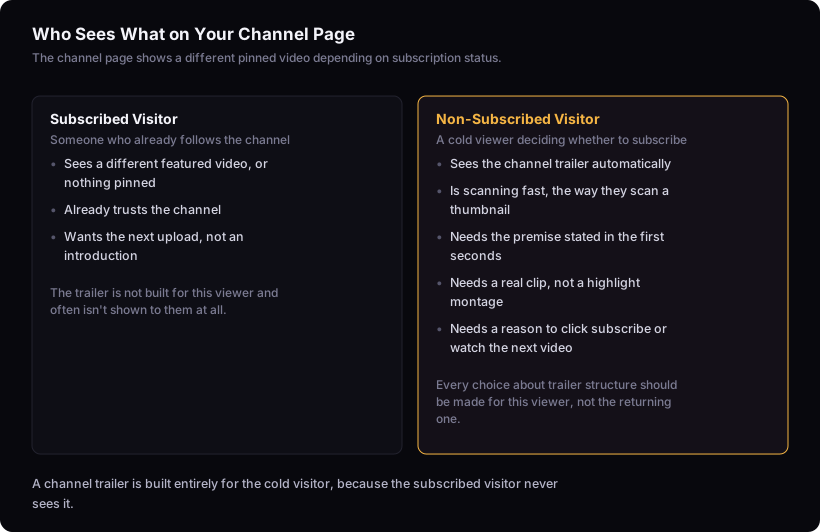
This matters because most guides treat the trailer like a general-purpose intro video: something that explains who you are, maybe with some brand personality, maybe reused as an "about" piece elsewhere. But a video aimed at someone who already subscribed and a video aimed at someone deciding whether to is a different design problem. A returning viewer already trusts you and wants the next thing. A cold viewer on your channel page is doing exactly what they do when scanning a thumbnail in the feed: deciding fast whether to invest time in something unfamiliar. The trailer should be built for that second situation, not the first.
Setting up the trailer: where it lives and how to assign it
You assign a trailer through YouTube Studio's channel customization settings, under the "Basic info" or "Layout" tab depending on the current interface, where there's a dedicated slot labeled for non-subscribers. You pick any existing video from your channel — it does not have to be a new production made specifically for this purpose.
This is worth saying plainly because it removes a barrier that stops a lot of creators from ever setting one up: if you already have a video that explains your channel's premise clearly, in miniature, you can repurpose it as the trailer today. A strong "who I am and what I make" video, an early flagship upload, or even a well-performing video that happens to demonstrate your format well can all work. You're not required to storyboard, shoot and edit something new before this piece of packaging exists. The bar is picking the right existing candidate or, if nothing fits, making one that's short and purpose-built — not achieving a particular production standard.
What to put in it: applying packaging thinking to trailer structure
A trailer works when it does two things immediately: makes the channel's premise obvious, and gives the viewer a reason to keep watching. This is the same job the rest of your packaging does. On thumbnails and titles, that pairing — obvious premise plus something withheld — is what separates videos that get watched from videos that get scrolled past. We treat that pairing as the strongest working pattern for titles: clarity plus curiosity, where the premise is immediately clear but one question stays open. A trailer should follow the same shape at video length: say what this channel is, in the first few seconds, then leave a reason to want the next video rather than closing every loop in the trailer itself.
The mechanism is worth stating because it's the same test we apply to thumbnails: we check a thumbnail at actual feed size on a phone, under a second, checking whether the visual premise is obvious and whether there's some curiosity — if it takes study, it's too complicated. A trailer gets more time than that, but a cold viewer's patience is still short. If someone has to sit through a minute of stylized intro before understanding what the channel is actually about, the trailer has failed the same test a confusing thumbnail fails, just more slowly.
For structure: open with the premise stated directly, not implied through a montage. Show, briefly, what an actual video from the channel looks like — a real clip, not a generic highlight reel. Close with something that points forward rather than wrapping up neatly, since the goal is the click to subscribe or the click to the next video, not a satisfying ending in itself.
Read the rest of the upload page for how this fits with everything else you fill in before publishing, and see designing the thumbnail for the same clarity-and-curiosity logic applied to a still image instead of thirty seconds of video.
How long should it be, and what should it avoid
Shorter than most creators think, because the audience is cold and has no accumulated goodwill toward you yet. A trailer that runs several minutes is asking for patience a non-subscribed viewer hasn't earned the right to ask for. Aim to state the premise in the opening seconds and keep the whole thing tight enough that someone can watch it in the time they'd otherwise spend on one more scroll of the channel page.
The common failure modes are predictable once you know the job the trailer has:
- A generic montage of clips with no stated premise — it looks like a highlight reel for a channel the viewer hasn't decided to trust yet, and it answers "what has happened on this channel" instead of "what will I get if I subscribe."
- Explaining the channel in the abstract ("I make videos about...") without showing what an actual video looks and feels like.
- Treating it as a vanity piece — cinematic titles, dramatic music, no concrete content — when the viewer needs information, not a mood.
- Making it long because it was expensive to produce. Production cost has no bearing on whether it does its one job.
Why you can't measure a trailer's performance the way you measure a video
You cannot A/B test or benchmark a trailer's performance the way you can test a title or thumbnail, because YouTube doesn't expose impressions, click-through rate or retention data specific to the trailer slot. Those metrics exist for videos in feed, search and suggested placements — a trailer isn't served through those surfaces, it's shown once, automatically, to a small and specific audience segment (non-subscribed channel-page visitors), and Studio analytics don't break that traffic out separately from the rest of the video's stats if you reuse an existing upload.
This is worth being direct about because most advice implies you can optimize a trailer the way you optimize a title: publish, check the numbers, iterate. You can't. There's no comparative benchmark for trailer conversion the way there's no single good click-through rate that applies across channels — but at least CTR is a number you can watch move. A trailer gives you nothing to watch move. Its performance is folded into subscriber growth and channel-page traffic in aggregate, with no way to isolate the trailer's contribution from everything else happening at the same time.
What you're left with is a judgment call, not a metric: does this video pass the clarity-and-curiosity test on watch-through, and does it represent the channel a new video actually made this month would represent it. That's qualitative, and it should stay qualitative rather than pretending a proxy metric settles it.
Updating your trailer as your channel changes
Revisit your trailer whenever your channel's premise shifts or a video comes along that represents the channel better than what's currently assigned — a trailer is maintenance, not a one-time setup task. If you've changed niche, changed format, or simply gotten better at making the kind of video that defines the channel now, the trailer you set up a year ago is describing a channel that no longer exists. A viewer who watches an outdated trailer and then browses your recent uploads sees a mismatch, which undermines the exact trust the trailer exists to build.
A natural trigger point is after you've done the work in how to find your youtube niche (without guessing) and landed on a clearer premise than you started with — that's usually also the moment your old trailer stops matching. Another is simply having a newer video that states the premise more directly than your current trailer does; swap it in.
The limit here
This method can tell you how to structure and set up a trailer using the same packaging principles that work elsewhere on the channel, but it cannot tell you whether your specific trailer is converting cold viewers into subscribers. YouTube does not expose impressions, CTR or retention data specific to the trailer slot, so there's no metric-based way to test or optimize it the way you can test a title against youtube impressions vs views: what the pair actually tells you for a regular upload, or run through what to check before publishing a youtube video before it goes live. Treat the trailer as packaging you keep honest and current, not as something you can iterate toward a number, because there isn't one to iterate toward.