Roundups in this category are mostly ranked lists where the ranking is the product. This one is organised by the job you are trying to do, because "best" is meaningless until you have said best at what — and because most creators end up running three or four tools that each do one thing rather than one that does everything badly.
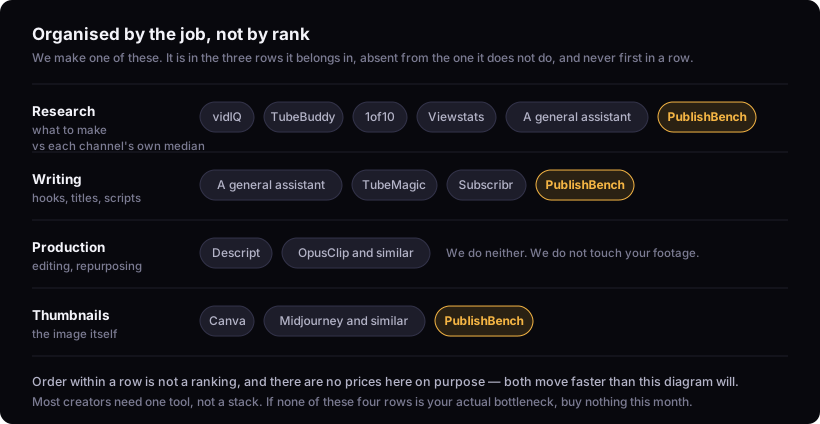
We make one of these. It is in here, in the section it belongs in, and not at the top.
Why there are no prices on this page
Every tool below changes its pricing, and several restructured their tiers in the last year. A price table here would be wrong within weeks, and a wrong price in a comparison is worse than no price — people plan around it.
We also could not verify current pricing to a standard we would publish. Pulling vidIQ's pricing page while writing this returned a paid tier listed at $0/month, which is plainly a rendering artefact rather than the truth. Publishing that number because a scraper produced it is exactly the failure this site exists not to commit.
So: check pricing on the vendor's own page, on the day you buy. Where a tool has a genuinely free tier that is worth using on its own, it says so below, because that is durable in a way a number is not.
Research: finding out what to make
vidIQ and TubeBuddy are the incumbents, both browser extensions layered over YouTube itself. Their real strength is that the data sits where you already work — you are on a video page and the panel is there. If you want a keyword tool, competitor stats and a bulk-editing suite in one extension, this is the category and they own it.
Where they are better than us, plainly: breadth of tooling, years of iteration, bulk operations on your own back catalogue, and a browser extension we do not have. If you want the numbers overlaid on YouTube while you browse, we do not do that.
The thing to understand about both is that they print estimated search volume and score. Those estimates are models, not measurements — YouTube does not publish search volume to anybody — and how much weight to give them is a judgement you are making whether or not you realise it.
1of10 and Viewstats are narrower and better at the narrow thing: finding videos that overperformed their own channel. If outlier discovery is the entire job you want done, a specialist beats a suite.
A general assistant — ChatGPT, Claude, Gemini — is genuinely good at the reasoning half of research: turning a vague subject into angles, pressure-testing whether a topic has legs, arguing with your positioning. It has no access to YouTube data, so it cannot tell you what actually performed. Used for judgement rather than facts, it is underrated here.
Where we sit: we measure a video against its own channel's median rather than against YouTube at large, which is the difference between "this got a lot of views" and "this beat what that channel normally does" — the second is the only one a smaller channel can act on. The watchlist runs that comparison daily on channels you pick and tells you when an upload breaks out. The teardown does it on a single video and keeps the measured half separate from the interpretation, with the arithmetic shown for both, so you can see exactly how much of the analysis is evidence.
The part we would argue is genuinely better: every number is defined somewhere you can read, and the method behind each one is published rather than hidden. Most tools in this category hand you a score. Ours tells you what the denominator was, how many uploads it came from, and when it refuses to compute one at all.
Two limits on top of the ones above: we do not estimate keyword search volume at all, so if that number drives your planning the suites have it and we do not. And our window on the YouTube API is 30 days, which buys a point-in-time cut rather than a year of history.
Writing: hooks, titles, scripts
This is where general assistants are strongest and most creators under-use them. A good model with a well-specified prompt writes a serviceable script.
What it does not do is keep the work. You are copying out of a chat window into a doc, losing the version history, re-pasting context every session, and hand-managing the relationship between the title you chose and the thumbnail you briefed. That overhead is invisible per video and substantial per month.
Dedicated script tools — TubeMagic, Subscribr and others — exist to close that gap. Whether they are worth it over an assistant plus discipline depends almost entirely on how many videos you make. At two a month, discipline wins. At two a week, it does not.
Where we sit: this is what PublishBench is for. Not "AI writes your script", which everything does, but that the research, the hook, the title, the script, the thumbnail brief and the metadata are one object with versions, and every stage carries the same published method as the research half. If you want a chat window you already have a better one.
Production: editing and repurposing
Descript edits video by editing text, which is a genuinely different interaction rather than a feature. If post-production is your bottleneck, this is the strongest recommendation on this page and nothing here competes with it.
OpusClip and similar turn long-form into short-form automatically. Useful, and worth being clear-eyed about: automatic clipping finds moments that look like clips, which is not the same as moments that work as clips. Treat the output as a shortlist.
We do neither of these. We do not touch your footage.
Thumbnails
Canva is the default for a reason — fast, familiar, and enormous template coverage. For most creators most of the time it is the correct answer.
Image models via Midjourney or similar produce backgrounds nothing else will, at the cost of a workflow and a learning curve.
Where we sit: we generate the background and give you real layer control at exactly 1280×720 with versions, in the same place as the title it has to coordinate with. That last part is the argument. If you are happy in Canva, Canva is fine.
How YouTube creators choose between these tools
Ask what breaks first.
| If your bottleneck is… | Start with |
|---|---|
| Not knowing what to make | An outlier tool measured against each channel's own median — ours, or a specialist |
| Editing time | Descript |
| Turning long-form into Shorts | An auto-clipper, reviewed by hand |
| Blank-page paralysis on scripts | A general assistant, properly prompted |
| Work scattered across five apps | An integrated workspace — including ours |
| Thumbnails taking hours | Canva, unless you need generated imagery |
Most creators need one tool, not a stack. The stack is what you accumulate by buying the answer to a problem you did not have. If nothing in the left column is your actual bottleneck, the honest recommendation is to buy nothing this month.
What this page cannot tell you
Which is best for you. Every recommendation above is conditional on a bottleneck, and only you can see yours.
Whether any of them will grow your channel. No tool has ever been the reason a channel worked. They remove friction from work you were going to do anyway, and a tool that removes friction from making videos nobody wants has made the problem faster.
Whether we are worth reading on this subject at all. Treat this as an informed argument from an interested party — which is what every roundup in this category is, including the ones that do not say so.
If you want to see what we do without an account, every tool has a public page describing what it does and what it cannot, and the free plan needs no card.